
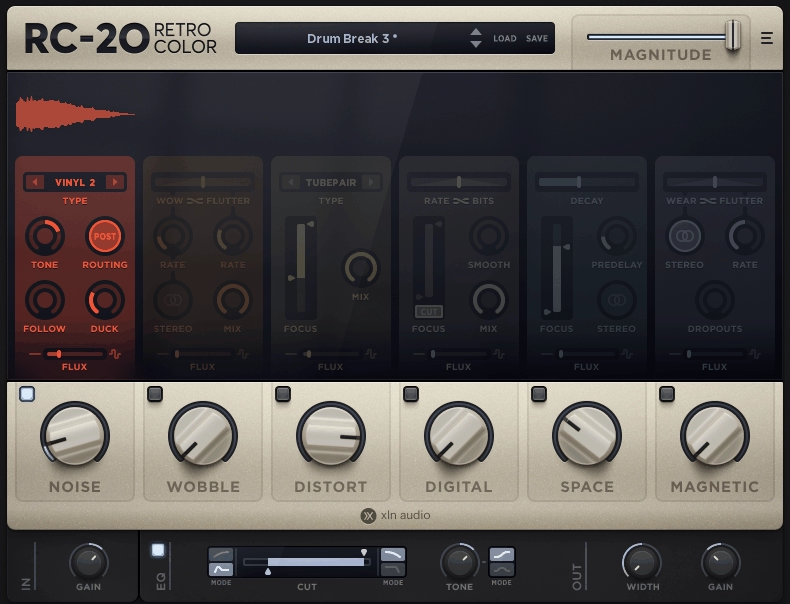
Looking for the best lo-fi plugins to add vintage warmth and character to your productions? I’ve spent few hours testing degradation tools, tape emulators, and vintage processors to find what actually delivers believable retro vibes without turning into a generic “dusty” overlay.
I’ll walk you through specific plugins like RC-20 Retro Color, Arturia Pure LoFi, Unfiltered Audio LO-FI-AF, and more + free plugins at the end as well..
These tools understand that convincing retro character comes from layering multiple imperfections that interact naturally, whether that’s tape saturation meeting pitch instability, vinyl modeling that never repeats the same crackle pattern, or sampler engines that let you build degraded textures from the ground up.
Whether you need tape wobble for mellow beats, vinyl crackle for dusty samples, or that perfectly imperfect hardware sampler aesthetic, these plugins handle everything from subtle analog warmth to full on degraded chaos.
Here’s what made the cut and why they’re actually worth your time:
1. Arturia Pure LoFi
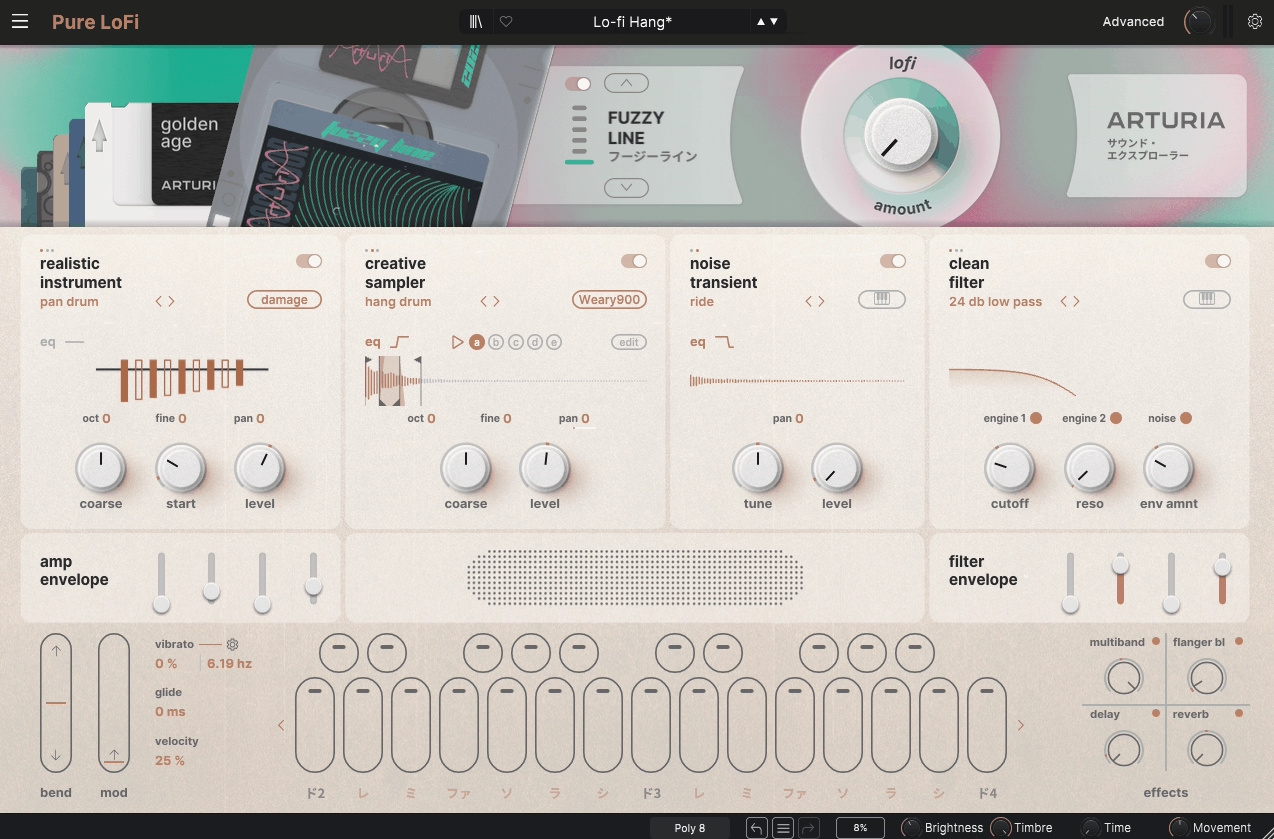
Arturia Pure LoFi plugin is not a one trick “make it dusty” effect. I feel like it’s more of a full instrument built around layering and controlled degradation, so you can start from believable multisampled sources, synthetic waveforms, or your own audio, then push everything through sampler style color and a dedicated lo fi processor.
The core idea is simple: you get two engine slots running in parallel, and you shape each layer into the same nostalgic space without losing the ability to keep one layer clean and the other destroyed. That being said, this is where Pure LoFi really shines compared to basic insert effects. I noticed that the two slot architecture lets you build patches where the front of the sound is an organic transient and the tail is a warped synthetic smear.
- Why it’s good choice for Lo-Fi:
You can layer clean multisampled instruments with degraded textures in one plugin, automate between “almost clean” and “collapsed tape memory” instantly, and use the 250+ presets from dreamy synths to cracked pianos. The workflow is fast because everything lives in one interface instead of routing through multiple insert effects.
- Creative Sampler Engine
The sampler engine is where Pure LoFi becomes personal because you can pull your own audio in. Officially, Arturia supports importing your own samples into the Creative Sampler and also into the Noise Oscillators, which is huge if you already have a library of one shots, field recordings, resampled chords, or hardware snippets.
From a feature perspective, the sampler is designed for musical, loopable material rather than forensic editing. You get control that matters for this style of work, like round robin behavior and loop direction options, plus basic shaping around tuning and envelopes.
There is also an important limitation to keep straight: you cannot import your own multisampled instruments at the moment, and even though the Realistic Instrument engine uses SFZ internally, it relies on their specific configurations.
- LoFi Oscillator Engine
The oscillator side is built on a library of 130+ digital waveforms, which includes “clean enough” shapes and more artifact driven material that sits well under degradation. The LoFi Oscillator is a wavetable oscillator in the back end, but wavetable import is not currently supported as an official feature.
- Hardware Modes
Each engine slot includes 9 hardware degradation modes inspired by classic sampler and early digital flavors, including references like SP1200, MPC, and CMI, plus Arturia’s own custom modes such as Deteriorate, Damage, and Crush.
The value here is speed and specificity: you can pick a recognizable era of limitation first, then fine tune. In practice, these modes help you get the “this came from a sampler” feel before you even touch the global lo fi processing.
- The LoFi Processor
Beyond per engine hardware modes, Pure LoFi has a dedicated LoFi processor with six styles and six macro parameters, plus a global LoFi amount that makes it easy to automate between “almost clean” and “collapsed tape memory.”
The styles are named Golden Age, Velvet Frost, Vintage Glow, Dim Memories, Cathodic Tube, and Fuzzy Line, and the parameters include Drive, Wobble, Wear, Speaker, Tone, and Vintage.
What matters musically is the division of labor. You can use the hardware modes to establish the sampling era and artifact type, then use the LoFi processor to decide how the sound behaves in time, with pitch instability, wear, speaker style narrowing, and bit or sample reduction character all living in one place.
- Presets and Factory Content
Pure LoFi comes with 250+ presets, and the range spans dreamy synths, decayed keys, cracked pianos, and liminal textures. The value of the preset library here is not “instant lofi”, it is that the presets demonstrate the internal logic of layering plus hardware mode plus LoFi processor, so you can reverse engineer what makes a patch feel like a degraded instrument rather than just a clean sound with a vinyl layer on top.
2. Unfiltered Audio LO-FI-AF
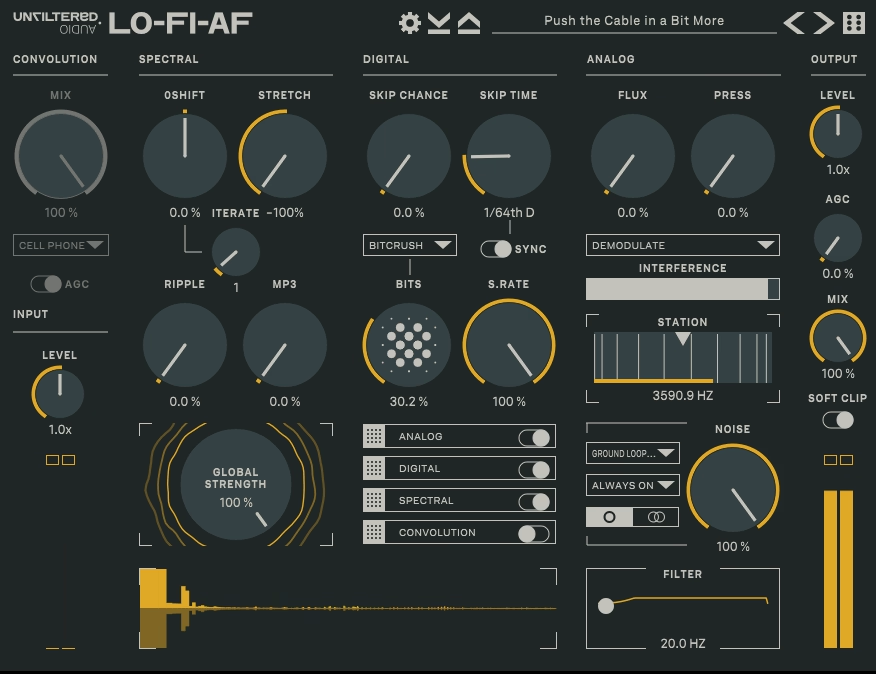
This is a dedicated lo-fi multi-effect designed around creative degradation and coloration rather than conventional clean processing. To be honest, I think Unfiltered Audio LO-FI-AF is one of the most versatile lo-fi processors I’ve used because it functions as a modular effect environment that combines analog-style saturation, sample rate reduction, filtering, dynamic control, and convolution into a flexible chain you can reorder and control.
In the bigger picture, this is not a one-knob toy effect; it encourages exploration and sound crafting where you decide how much each component contributes, how they interact, and where in the signal path they sit. For instance, you can dial in gentle saturation and mild grit for a mellow beat, or push into chaotic aliasing and distortion for an experimental track.
- Why it’s good choice for Lo-Fi:
You get modular control over every aspect of degradation from sample rate reduction to saturation to convolution-based coloration, letting you craft unique lo-fi textures that fit your track perfectly. The impulse response engine adds physical hardware character and room resonances that generic lo-fi plugins can’t achieve. You can build anything from subtle warmth to extreme glitchy destruction.
- Impulse Response Engine
One of the standout features in LO-FI-AF is its impulse response loader. Instead of just simulation curves, the IR engine lets you import your own impulse responses and use them to color or reshape the audio.
This means you can embed hardware capture sweeps, room tone impulses, or even unusual response scans as part of your lo-fi palette. Community threads highlight creative uses where producers load atmospheric or metallic IRs to give the effect a signature feel rather than the generic “recorded on cassette” vibe.
- Sample Rate and Bit Depth Reduction
The sample rate and bit depth controls let you dial in the amount of digital artifacting. Unlike simple reducers, LO-FI-AF’s implementation feels like tuning an engine: you get real-time feedback as aliasing and harmonics shift, and small adjustments can go from clean warmth to distinct crunch.
- Saturation and Distortion Controls
LO-FI-AF’s saturation and distortion modules give you analog-inspired warmth, edge, and harmonic complexity that react to the input signal and downstream processing settings. Because each module in the chain affects the others, the saturation doesn’t feel static. You can build smooth tube warmth for mellow parts or push into gritty, aggressive distortion that still sits in the mix without harshness.
- Dynamic Control and Modulation
LO-FI-AF includes dynamics processing that helps you tame or accentuate transient behavior after extreme processing. You can shape how peaks and sustain behave so the lo-fi character sits well in your mix. The plugin also includes randomization and modulation options for subtle motion that keeps lo-fi textures interesting through a track.
- Presets and Workflow
LO-FI-AF comes with a broad set of factory presets covering everything from gentle warmth and soft grit to heavy degradation and glitch-inspired treatments. The presets show different ways the blocks can be combined to achieve a character, making them a learning tool as much as a convenience.
The UI is visually clear with modules that light up and show activity, so parameter feedback feels immediate. Available in VST2, VST3, AU, and AAX formats with stable performance across DAWs.
3. XLN Audio RC-20 Retro Color
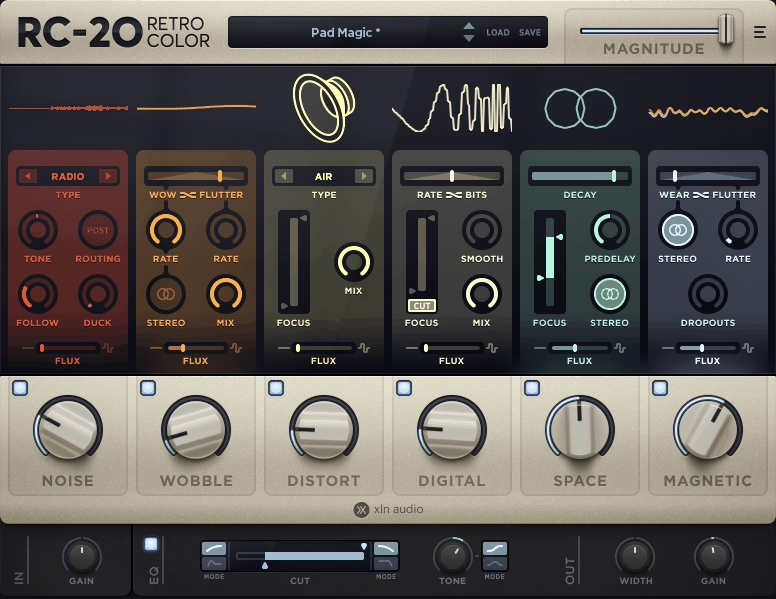
Vintage character is not one effect, it is a blend of multiple imperfections that interact. That’s the core idea behind this plugin, and it earns its reputation in real sessions because it is fast, repeatable, and musical even when you are pushing it hard.
From my experience, XLN Audio RC-20 Retro Color delivers this by giving you six dedicated modules running in a parallel bank, so you can stack different types of wear and tone without having to build a whole rack of separate plugins and then fight gain staging and routing.
I found that each module has its own amount control, and XLN’s layout makes the “how much” decisions obvious, which matters when you are shaping character across multiple sources in a mix. In fact, the Magnitude slider scales the entire setup at once, making it perfect for automating transitions like intros, drops, and outros.
- Why it’s good choice for Lo-Fi:
You get six parallel modules for noise, wobble, distortion, bitcrushing, reverb, and tape wear that you can blend and automate with one Magnitude slider. The Flux Engine adds organic randomness so sustained material like pads and vocals feel like playback rather than static effects. Fast workflow with practical presets tailored for drums, keys, guitars, and full mixes.
- The Flux Engine
I like how Flux Engine adds randomness and fluctuations to each module. In practical terms, Flux is what turns the same preset from “a filter plus noise” into something that behaves more like playback. It is also why RC-20 can sit on sustained material like pads, vocals, and sampled chords without sounding like a looped texture stamp.
- Noise Module
When it comes to Noise Generator, it synthesizes 16 flavors of seamlessly looped mechanical and electronic noise, spanning vinyl and tape hiss through ambient studio noise, circuit hum, stompbox style static, and even VHS textures. This matters because the noise layer is often what sells the illusion, and with RC-20, you can choose noise that matches the story of the sound.
- Wobble Module
Next, Wobble and Flutter module recreates pitch inconsistencies from unstable analog gear like record players and tape machines. It separates wow and flutter behaviors and lets you blend them, giving you complex pitch movement without resorting to chorus plus random LFO hacks. The result can be subtle and believable or aggressively animated.
- Distort and Digital Modules
In addition, Saturation and Distortion module covers a wide range from mild saturation to fuzzier destruction with multiple distortion types. The Degrader and Bitcrusher module recreates vintage digital gear behavior like old school samplers with limited sample rates and bit reduction, perfect for adding era-specific crunch or brittle edge.
- Magnetic and Space Modules
Lastly, Magnetic module reproduces Volume Drops associated with tape recording wear and tear, making clean sustained synths feel like fragile recordings. The Reverb module is a tailored reverb for depth and width, though many experienced mixers treat it as optional and rely on their main reverbs instead.
- Magnitude Slider and Automation
The Magnitude slider scales the entire setup at once, making it incredibly effective as a macro automation target. You can dial the perfect amount and automate transitions across your arrangement, which is the difference between a color plugin you set and forget versus one you can perform with.
- Presets and Workflow
RC-20 lofi plugin comes with presets tailored for drums, keys, guitars, bass, full mixes, and post production. The presets work as starting points and routing ideas, and the real power is in how quickly you can rebalance module amounts and scale everything with Magnitude. Available in VST, AU, and AAX formats plus a standalone application for Windows and macOS.
4. Arturia TAPE MELLO-FI
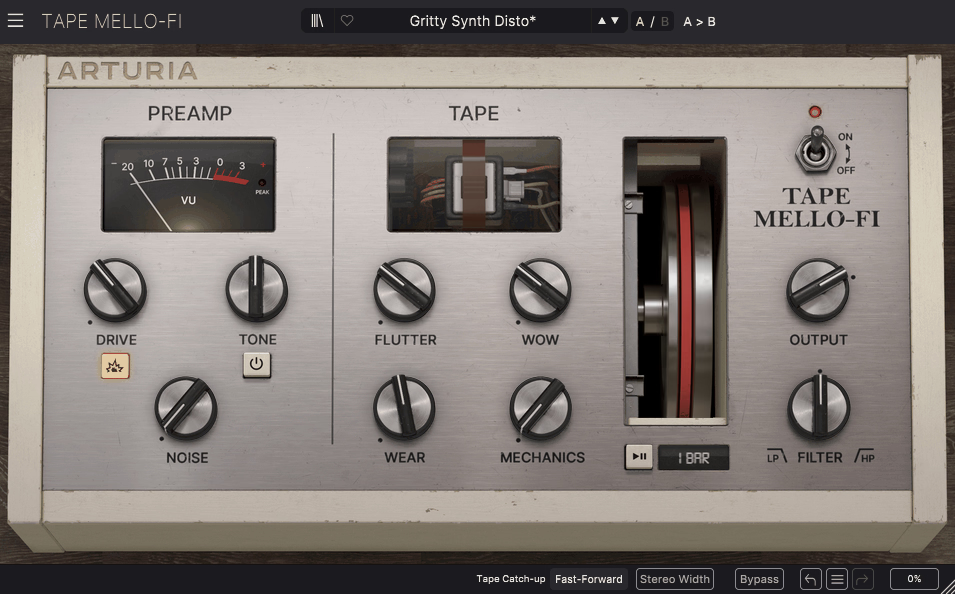
Arturia Tape MELLO-FI is a tape flavored lo fi processor that focuses on the specific combo that made Mellotron style playback feel alive: a slightly gritty preamp stage, unstable transport, audible mechanism noise, and that slow down tape stop drama when you want it.
From what I can tell, it is intentionally not a deep “studio tape machine” model for mastering, but rather a character box you throw on a track or bus when you want warmth, motion, wear, and believable mechanical mess in one interface. In the long run, the plugin is built as four practical sections that match how you actually use it in a mix: Preamp, Tape, Tape Stop, and Output.
I would say you can get a usable result without hunting for hidden panels, and you can treat it like a fast “make it feel printed” effect rather than a sound design rabbit hole. For example, the Preamp section gives you Drive, a Boost switch, a Tone control, and a Noise knob where Drive ranges from tape saturation through to more aggressive overdrive.
Also, the Tape section includes Flutter, Wow, Wear, and Mechanics controls that create movement reading as playback, not chorus. Honestly, the interactive tape wheel and tempo synchronized Tape Stop are the signature features that make transitions feel authentic.
- Why it’s good choice for Lo-Fi:
You get preamp drive, noise, wow, flutter, wear, and mechanics in one interface without building a chain. The tempo synced tape stop with fast forward catch up creates authentic machine artifacts for transitions. Low CPU usage means you can use it across multiple tracks, and the 25 preset library gives you instant retro treatments you can push with automation.
- Preamp Section
The Preamp side includes Drive for tape saturation through aggressive overdrive, a Boost switch for extra push, a Tone control for tape style band limiting, and a Noise knob for tape hiss. The Tone control is quite extreme and works like a deliberate commitment rather than subtle polish, which is great when you want the sound to step backward in time. The Noise is tied to the tone and saturation rather than floating on top like a separate vinyl layer.
- Tape Section
The Tape section gives you Flutter for faster pitch instability, Wow for slower drift, Wear for degradation, and Mechanics for audible transport and motor artifacts. Low amounts of wow and flutter can make static sources sit better in a mix by adding micro motion, while higher settings push into obvious wobble. Wear gets you into rougher territory without needing a separate bitcrusher, and Mechanics makes the difference between “lo fi filter” and “this sounds like a machine.”
- Workflow Features
Also some boring stuff,, it includes Undo and Redo plus a History window that tracks adjustments during a session, making it easier to push hard, pull back, and compare without losing your way. The plugin is designed to be automated heavily, which is exactly how it should be used if you want it to feel integrated instead of pasted on.
5. Unfiltered Audio Needlepoint
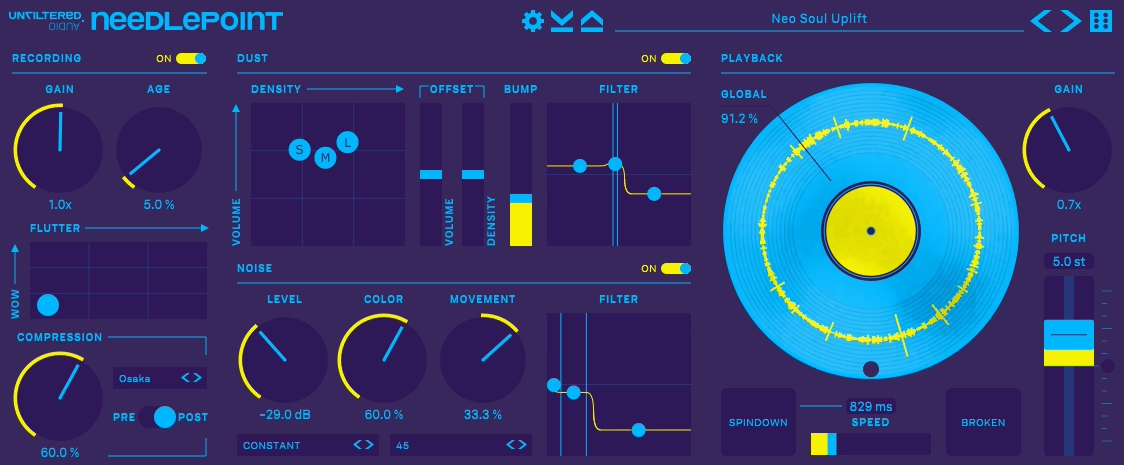
Vinyl simulators often rely on looping crackle samples, but some people want a vinyl layer that actually behaves like a physical playback system. I think the headline feature is physical modeling, meaning the noise and wear artifacts are generated in real time and distributed across a virtual spinning platter instead of replaying fixed recordings.
I mean, that single design choice with Unfiltered Audio Needlepoint is what makes it feel less repetitive on long passages, especially on sparse arrangements where you would normally hear the loop seam or recognize the same crackle pattern.
In addition, the plugin explicitly synthesizes detritus and distress like hair, dust mites, scratches, warping, and related playback imperfections tied to platter rotation rather than random noise bursts. On the flip side, you can dial in a record that feels “clean but alive,” or go all the way into broken thrift store vinyl without it sounding like a generic texture overlay.
For the most part, you get control over crackle types by adjusting the abundance and level of three different dust sizes, which matters if you are trying to fit the vinyl layer around a vocal or lead without swallowing transients.
- Why it’s good choice for Lo-Fi:
Physical modeling generates non-repeating vinyl artifacts across a virtual spinning platter, so you never hear loop seams or recognize the same crackle pattern. Turntable speed acts as a tone control and can tempo sync to your DAW. BROKEN mode creates authentic looping and glitchy phrases like a damaged groove. Built in sampler style compression with six modes gets you to finished vinyl vibes faster.
- Physical Modeling System
Needlepoint’s physical modeling synthesizes hair, dust mites, scratches, warping, and related playback imperfections in real time tied to platter rotation. You get control over crackle types by adjusting three different dust sizes, which lets you fit the vinyl layer around vocals or leads without swallowing transients.
The noise behavior can be static or follow amplitude, so background texture tucks in when the source is quiet and rises naturally when loud.
- Wow, Flutter, and Automation
I appreciate how it gives you continuous control over wow, flutter, and pitch explicitly built for automation by hand. The best vinyl movement drifts, catches, and occasionally misbehaves rather than staying static. Wow and flutter create playback instability you can ride for transitions or keep subtle for constant motion, and it reads as playback instability, not chorus.
- BROKEN Mode and Spindown
BROKEN mode generates unpredictable looping effects and cut up, glitchy phrases, basically mimicking the behavior of a damaged groove or a record that catches and repeats.
The SPINDOWN button provides authentic vinyl stop and start behavior for end of phrase slowdowns or DJ style stops without building automation curves. If you treat it as a performance effect, it can create transitions and phrase edits that still feel grounded in the record metaphor.
6. Thenatan Vybz
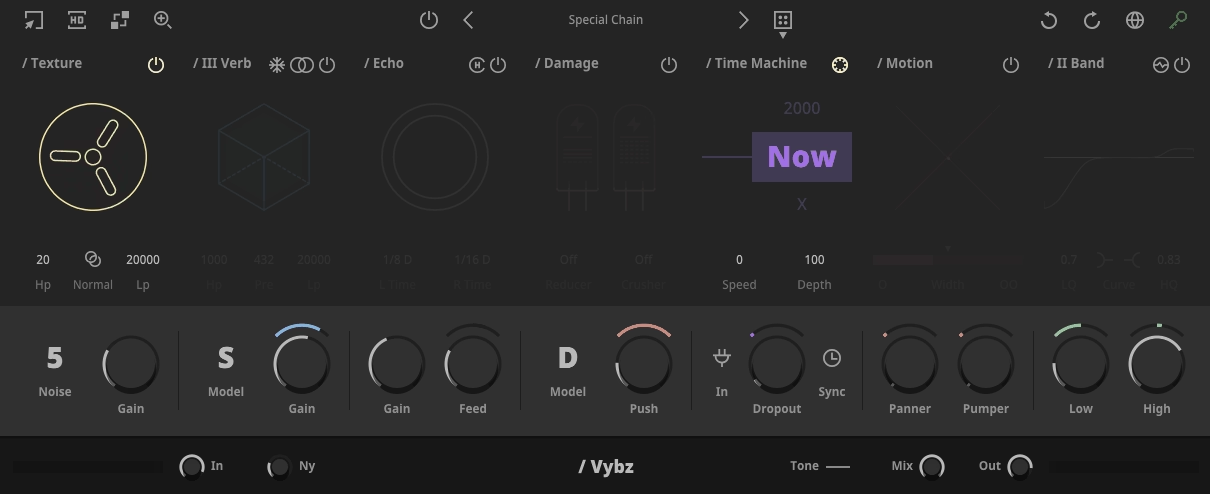
For some reason, love this multi effect plugin. Thenatan Vybz is a sound design channel strip for retro wear, movement, and space where the point is not pristine emulation of one device but stacking several believable “faults” fast in one place. When it comes to coverage, it handles the full chain from texture and ambience through delay, distortion, reduction, era filtering, and motion, with a master section that makes it easy to keep levels under control while you get aggressive.
In addition, Vybz lofi VST plugin is organized into sections that map to real production decisions: you add Texture first if you want material and grit around the source, you build depth with III Verb and Convolution Reverb, you add rhythm and smear with Echo, you rough it up with Damage and the Reducer Bit Crusher, you age the tone with Time Machine and VHS, and you make it move with Motion.
Honestly, the value is how quickly you can create a finished degraded tone without building a 6 plugin chain and then babysitting gain staging and modulation. I found that the Texture module ships with 9 recorded noises and textures and also supports drag and drop of your own noise samples, which is the practical difference between “always the same vinyl crackle” and a texture layer that actually fits the song.
- Why it’s good choice for Lo-Fi:
Well, I would say because you get texture layering, retro space, delay color, distortion, bit crushing, decade style tonal aging, and rhythmic movement in one interface. The Time Machine section lets you choose year range from 1930 to now to push tonal profile into different decades. Drag and drop your own noise samples and impulse responses to match the sonic world of your project instead of generic stock sounds.
- Texture Module
The Texture module ships with 9 recorded noises and textures and supports drag and drop of your own noise samples. You get ducking plus high pass and low pass controls so you can keep the texture out of the vocal zone or stop it from masking transients on drums. If you work fast, ducking and filtering right inside the texture module is what makes it usable on more than one track in the same session.
- Reverb Section
III Verb offers three reverb types, Freeze for infinite sustain style drones, and mono stereo plus HP LP filtering so you can keep the verb wide without letting low end wash build up. Freeze is a fast way to turn short material into pads and transitions.
The Convolution Reverb comes with 30 impulse responses covering chambers, plates, reversed spaces, and unusual options, plus drag and drop IR import so you can make Vybz match the sonic world of your project.
- Echo and Damage
The Echo module is a tempo synced delay with feedback, a Color control to darken or brighten returns, and added chorus to smear the repeats into a more tape like wash. Damage gives you four algorithmic distortion types plus a waveshaper with table control that lets you dial a more designed non linear curve for intentional harmonics on a bus rather than random clipping artifacts.
- Time Machine and VHS
I like how Time Machine section applies modeled EQ style voicings from past to present and lets you choose the year range from 1930 to now to push the tonal profile into a different decade. It includes a VHS button to mimic the vibe of tape and reel to reel style playback. In practice this is a fast tonal anchor that can make a modern clean synth sit like it belongs next to sampled material without spending time building multi band curves by hand.
- Drop Out and Motion
Next, Drop Out is a random audio muter with mix, sync, and frequency controls so you can create tape losing contact moments or stuttery gaps without drawing volume automation.
Motion includes stereo enhancement and widening, synced sidechain style volume modulation, trance gate, tremolo, panning, and a real time goniometer so you can see what you are doing to the stereo field. If you are using Vybz on buses, that visualization and synced modulation keep things intentional.
7. Wavesfactory Cassette
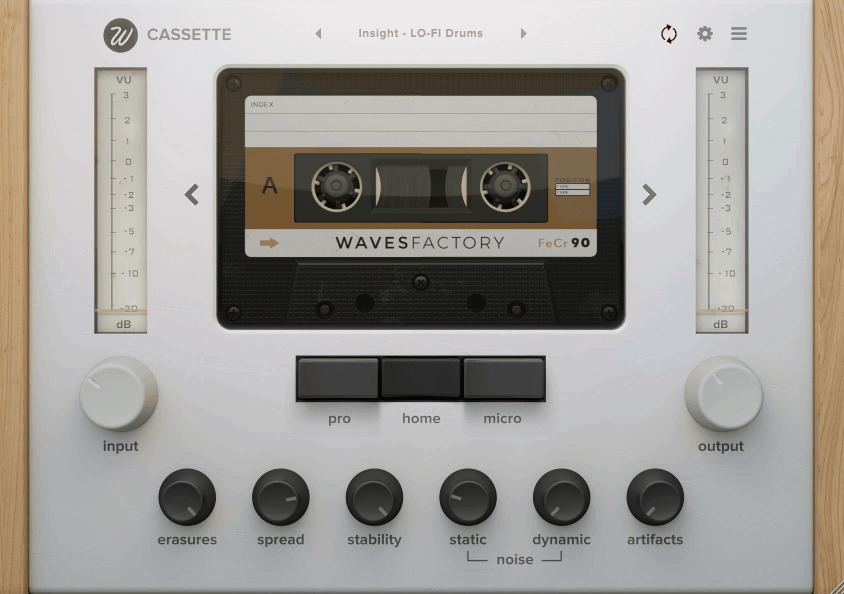
I also included Wavesfactory Cassette in the list as I think it’s really good choice for this article Basically, it’s a tape and deck emulator that’s built around the messy stuff people actually associate with the format: frequency dependent saturation, high frequency compression and roll off, hiss and asperity noise, plus the playback system problems like wow, flutter, dropouts, crosstalk, and random high frequency loss.
The key is that it’s not presented as a mastering tape machine. It’s explicitly a character tool, and the design reflects that: you get fast “front panel” controls for vibe, then a deeper settings panel where you can control how the instability and artifacts behave internally.
What stands out to me about Cassette is how you’re choosing both the tape stock and the playback machine, and those choices have real consequences for tone, saturation, compression, and noise behavior.
Plugin gives you get four tape types modeled after the consumer cassette standards: Type I, Type II, Type III, and Type IV, each with different frequency response and behavior.
Then, on the deck side, there are three deck types: Pro modeled on a Tascam 414, Micro modeled on an Omega Reporter 20 handheld recorder, and Home as a blend between them. Not to mention changing decks alters frequency response, saturation, compression, hiss, and asperity noise.
- Why it’s good choice for Lo-Fi:
You get authentic cassette character with four tape types and three deck models that change tone, saturation, and noise behavior. Asperity noise adds dimension and width without raising constant noise floor. Stability randomness creates believable wow and flutter instead of obvious LFO wobble. Artifacts control includes degradation and dropouts with precise shaping, plus Random Snap for tape catch moments.
- Input Drive and Noise System
Input gain is automatically compensated after processing, so you can drive the algorithm harder without loudness jumps. As you raise input, you get more saturation, more high frequency attenuation, more compression, and less perceived noise. Noise is split into Static noise (hiss) and Dynamic noise (asperity noise) that comes from tape surface imperfections and creates a 3D effect that can make mono sources feel wider. Noise auto mute stops hiss when no signal is detected, or you can make it continuous.
- Stability and Wow Flutter
The Stability control is the master for wow and flutter amount. At 100% there’s no pitch fluctuation. You can set wow rate, flutter rate, and Stability randomness that adds a random component rather than perfect sinusoidal LFO. Real cassette wow and flutter has randomness, and I would say it lets you control how much is baked into that movement, making it feel like unstable transport instead of obvious chorus.
- Artifacts and Degradation
The Artifacts control is a macro for degradation (slower random high frequency loss) and dropouts (faster random frequency loss). You can shape them precisely using degradation depth and rate plus dropouts depth and rate. Random Snap models the moment where tape catches, pitch drops, then releases and briefly overshoots. You can set how likely it occurs and trigger it via automation for rhythmic transitions.
8. Waves Retro Fi
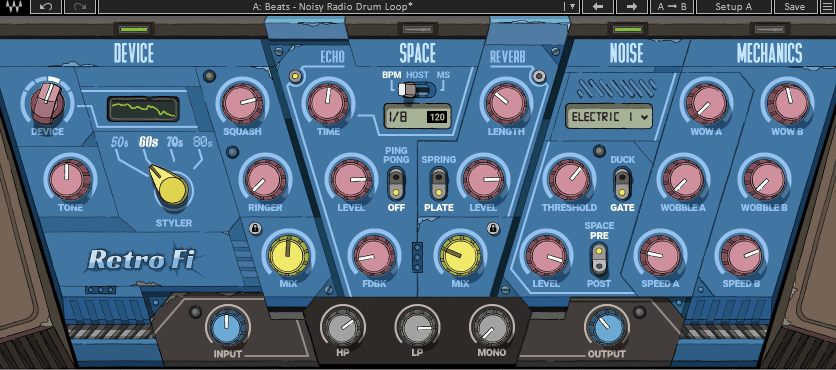
I would recommend you Waves Retro Fi lofi plugin if you are looking for a specific full lo fi effects chain designed to work like a single “character box” combining tone shaping, dynamics, space, noise, and mechanical instability into one coherent workflow for convincing retro imprints.
- Why it’s good choice for Lo-Fi:
In a big picture, you get five interactive sections (Device, Space, Noise, Mechanics, Master) in one plugin that covers IR-based tone shaping, compression/expansion, digital clipping, decade voicing, vintage echo with spring or plate reverb, dynamic noise with ducking or gating, and dual wow/wobble engines. And also fast workflow with 250 artist presets across genres.
- Device Module: IR-Based Tone Foundation
The Device module sets base personality with a four position selector that loads paired impulse responses for low and high frequency behavior, basically snapshots of different acoustic and playback interactions rather than simple EQ shelves. As you move through the steps, the tone shifts from brighter and airier toward deeper and duller, with the final step being a flatter IR so you can use dynamics and distortion without as much tonal imprint.
– Tone is a phase aligned blend between the selected high and low IRs, which is why it feels more like “steering” than turning an EQ knob. If you want Retro Fi to feel like a specific source chain rather than a blanket over the track, Tone is the control you keep coming back to.
– When it comes to Squash, it’s a one knob compressor and expander that can do downward compression or upward expansion depending on direction. You can either clamp transients into a denser cassette like print or bring up low level detail in a more exaggerated retro way.
– Next, Ringer is a ring modulator that creates digital clipping style distortion. Higher values mean more clipping with more high frequency content in the clipped portion. This is the part that can move from “warm retro” into intentionally ugly edge, especially on drums, vocals, or synth hooks that need to feel abused.
– And lastly Styler is the era switch offering 80s, 70s, 60s, and 50s textures, reproducing frequency limitation, dynamic limitation, and distortion typical of recordings from those decades, including the wear you would expect when listening now. This is not subtle by design, it’s a commitment tool for fast decade stamps.
- Space Module: Vintage Echo and Reverb
The Space module combines an echo processor with two reverb types: Spring and Plate. Spring is more percussive, plate is denser, which matches how you use them: spring for obvious retro “hardware in a box” movement, plate for thicker smear behind a source.
The echo section includes time modes with host sync and manual millisecond control, plus feedback and a Ping Pong switch for stereo movement. Having an echo you can lock to tempo without adding a separate delay plugin keeps the whole workflow fast.
- Noise Module: Dynamic Texture Generator
The Noise module includes a library of 64 WAV noise files across categories, and the engine interprets and plays them in a way that avoids recognizable looping. That “never sounds like a loop” behavior is why Retro Fi can sit through an entire arrangement without the noise layer giving itself away.
The dynamics controls make the Noise module mixable. You can run it as a Ducker where noise drops as input rises, or as a Gate where noise rises with input level, and you set the threshold using the input as a sidechain. That gives you the two practical behaviors: constant atmosphere that gets out of the way when the music hits, or noise that feels like it is being “excited” by playback and performance.
- Mechanics Module: Dual Instability Engines
The Mechanics module gives you two sets of controls, A and B, oriented toward cassette style artifacts for A and vinyl style artifacts for B. The key point is that you are not meant to keep them separated. You can mix them in any combination, which is how you get more complex, believable movement than a single wow flutter knob.
This works well on buses because you can set one engine to do slow drift and the other to do faster wobble, then blend them until it feels like a mechanism rather than a modulation effect. The dual engine approach creates layered instability that reads as physical playback quirks.
Freebies:
1. Steinberg LoFi Piano
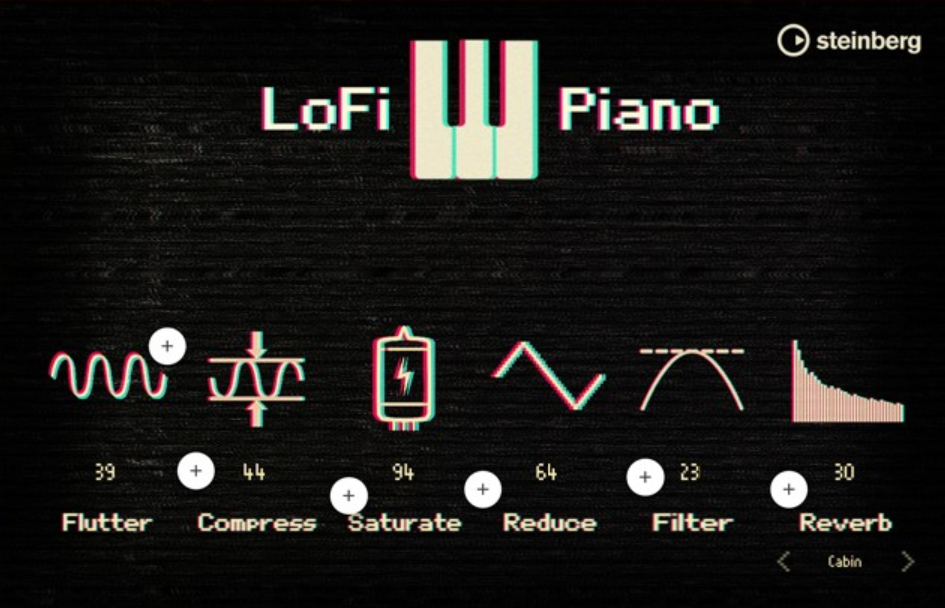
Steinberg LoFi Piano is a free upright piano instrument that is already pre shaped into a tape saturated, slightly worn sound, with just enough control to push it deeper into lo fi without turning into a full sound design workstation. The core sample set is an upright acoustic piano recorded with carefully selected vintage microphones, then processed to land in that gritty middle ground between modern clarity and older playback character.
Personally, I think LoFi Piano is not trying to be a pristine piano you later degrade with inserts, but rather the instrument is the vibe itself. In general, the base tone sits in the “already printed” zone where you get a piano that feels tape kissed, slightly softened, and ready for hip hop chords, mellow hooks, and harmonic beds that should not sound like a concert hall.
I realized that the default sound does not fight a dense beat because it naturally gives you a more compact top end and a more controlled transient profile than a clean studio upright.
For example, Steinberg describes it as beautifully tape saturated with “dusty ambience” intent, and that describes the target exactly. At the same time, you get six sound controls that act like a built in character chain: Flutter, Compress, Saturate, Reduce, Filter, and Reverb. I must say Flutter for tape speed instability makes sustained chords and held notes feel alive, and Compress helps the piano sit behind vocals or on top of drums without random peaks.
- Why it’s good choice for Lo-Fi:
The piano is already tape saturated and pre shaped for lo fi production, so you spend less time carving it into place. Six built in controls for flutter, compression, saturation, bit reduction, filtering, and reverb keep everything in one interface. MIDI Chord Pads with preset paired chord sets accelerate workflow when sketching progressions. Completely free and runs through HALion Sonic SE.
- Flutter and Compress
Flutter is the tape speed instability control creating small tape speed variations that produce frequency modulation. Practically, Flutter makes sustained chords and held notes feel alive and pushes the instrument from “warm piano” into “played back from a slightly unstable medium.” Compress reduces dynamic range, which matters for consistent harmonic weight rather than expressive classical dynamics. Compress helps the piano sit behind vocals or on top of drums without random peaks poking out.
- Saturate and Reduce
Saturate adds distortion and saturation directly inside the instrument. Treat it like tone and density, not like an effect. It is most useful for making the midrange feel more finished and for helping the piano read on smaller speakers without extra harmonic tools. Reduce lowers sample rate and bit depth, which is the “digital wear” lever and the quickest way to move from tape flavored warmth into crunchy, earlier digital territory.
2. Audiolatry LoQuest
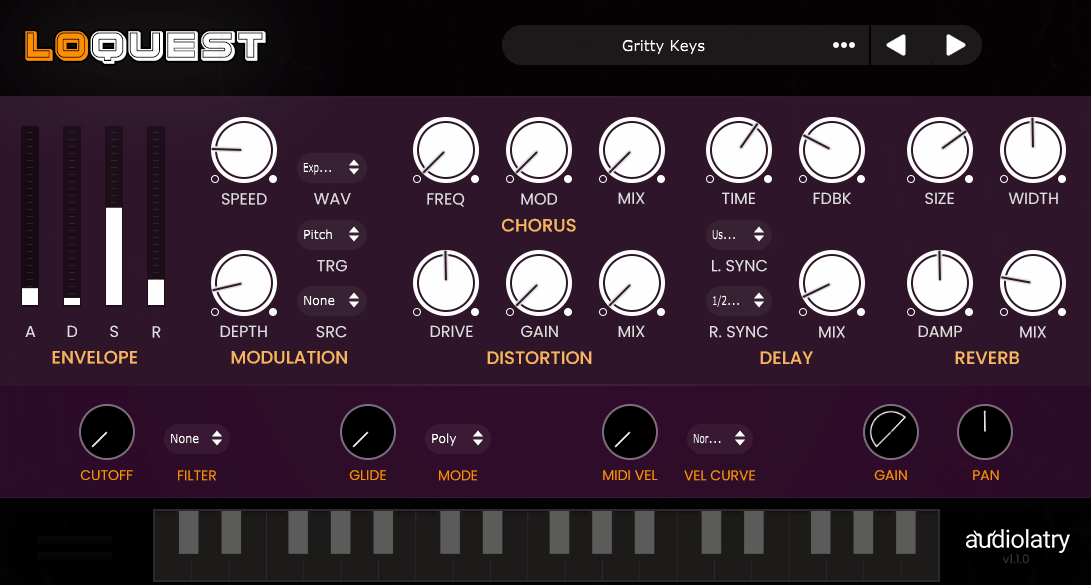
When you need a vintage leaning rompler style instrument, Audiolatry LoQuest is aimed at fast, moody writing rather than deep synthesis.
You load it when you want dusty keys, soft pads, bent plucks, airy leads, ambient strings, and similar nostalgic staples that already feel “printed” instead of squeaky clean. If you ask me, LoQuest is important because it is sample based and intentionally curated, so the sound set is compact, consistent, and genre ready without you building a whole chain first.
The plugin launched with 22 lo fi focused presets designed around warm, mellow, and cinematic adjacent colors, and the palette leans into playable, emotionally useful timbres rather than one off gimmick effects.
At first glance, you get cozy keys and organs that sit under drums, pads that already feel slightly aged, plucks with a soft edge, and string like textures that are more atmosphere than orchestral realism.
- Why it’s good choice for Lo-Fi:
You get 33 curated lo fi presets that already feel “printed” and aged, so you spend less time fighting harsh top end and overly clean transients. Built in ADSR envelope, LFO modulation, filter section, and effects for chorus, distortion, delay, and reverb keep everything in one interface. Completely free with royalty free commercial use licensing.
- Playability and Practical Controls
You get practical playability controls like poly or mono modes, glide, velocity response, pan, and gain, so you can repurpose a preset from a pad into a lead role or keep it tucked behind the groove without extra utilities. This makes the plugin flexible enough for both melodic hooks and background texture beds.
- Built In Effects
LoQuest includes onboard chorus, distortion, delay, and reverb that cover the essential movement and space you typically add to lo fi and ambient leaning instruments. The point is speed and cohesion, letting you turn a dry preset into something wide, smeared, and characterful inside the instrument. For practical production, this means you can commit earlier by shaping the envelope and filter, adding chorus for width, then adding delay and reverb for depth.
3. Chow Tape Model
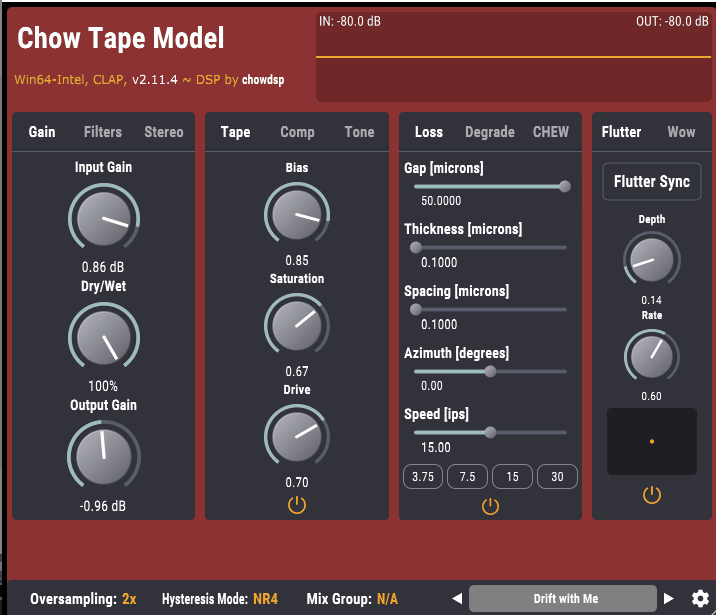
Chowdhury DSP Chow Tape Model is one of the few free tape plugins that actually feels like a tape machine model rather than a generic saturator with wow and flutter sprinkled on top. I think it started as a physics based model of a real reel to reel deck, originally the Sony TC 260, and then grew into a flexible tape system you can push far beyond “realistic” if you want broken, unstable, chewed tape effects.
I mean, that research origin matters because the controls are not random flavor knobs, they map to parts of the tape process that interact in believable ways.
In addition, Chow Tape Model covers two use cases that are usually split across different plugins: subtle tape thickening that takes the edge off bright transients and adds density without obvious distortion, plus deep lo fi tape behavior where pitch, noise, loss, wear, and mechanical failure become part of the groove.
On the flip side, you can choose which aspects you want, using it as a saturation device, a lo fi effect, or both, with dedicated sections for wow and flutter and the tape hysteresis controls.
For the most part, the manual lays out a clear internal chain with input gain, input filters, tone block with pre emphasis, compression, hysteresis tape stage, second tone block with post emphasis, followed by modules for chew, degrade, wow flutter, loss, and output. For instance, that pre emphasis and post emphasis pairing is one of those details that separates “tape inspired” from “tape modeled,” because tape systems are an ecosystem of EQ and dynamics around the record and playback chain.
I must say the hysteresis model is the core of the saturation, and you get meaningful controls like Bias treated like actual tape bias, plus hysteresis mode choices that select different solvers for the underlying Jiles Atherton equation. At the same time, the saturation can be clean and tape like, or asymmetric and stubborn, depending on how you drive it and how you set bias and saturation.
- Hysteresis Engine
The tape nonlinearity is built around a hysteresis model with Bias treated like actual tape bias. At lower bias the hysteresis curve gets wider, creating a deadzone effect associated with under biased tape. You get hysteresis mode choices that select different solvers for the underlying Jiles Atherton equation, letting you balance accuracy, stability, and CPU cost. The saturation can be clean and tape like, or asymmetric and stubborn, depending on how you drive it and how you set bias, drive, and saturation.
- Integrated Compression
The manual shows a dedicated compression block in the chain before the hysteresis stage. This is part of why Chow Tape Model can do that rounded transient thing without needing a separate compressor in front. When you combine compression with tape saturation, you get a slightly denser body, smoother peaks, and less spiky brightness, especially on drums and bright synth buses.
- Wow and Flutter
Chow Tape Model has a dedicated wow flutter section with depth and rate controls. With a small wet blend, you can get width and movement that feels more like transport instability than chorus. This can be used as an analog style double tracking effect, creating musical movement rather than seasick wobble.
- Degradation, Loss, and Chew
The Degradation section includes controls like amount and time varying variance, plus an envelope option for tape noise so noise can follow signal rather than sit as a constant layer. The Chew module simulates tape that has been chewed up by a broken machine, giving you audible mechanical failure for those moments when you want chaos, not tasteful analog glue.
4. iZotope Vinyl
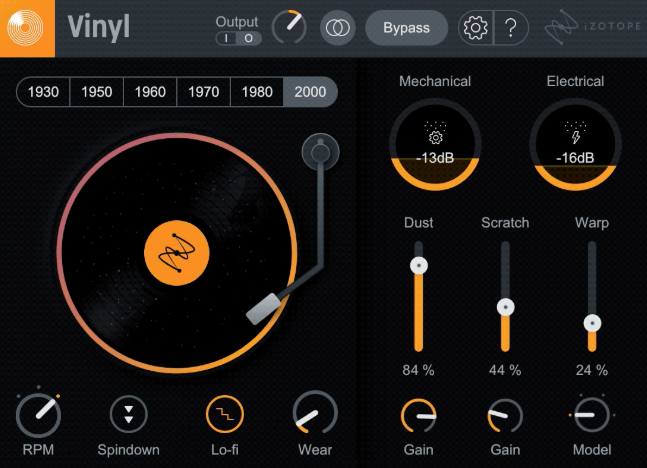
Well, this one makes any source feel like it is coming off a record with focused controls covering dust, scratches, warp, and mechanical noise.
I feel like I should mention it is not a “vinyl preset” that always sounds the same, but rather lets you choose exactly which parts of that illusion you want. In addition, each main control maps to a real aspect of the record experience, so you can be selective instead of stacking unrelated plugins.
Overall, the Year control is the fastest way to move a sound into a different decade without touching a separate EQ, modeling different decades using filter responses that resemble older playback and broadcast chains.
For instance, you can dial strings back to the 1930s using the year control, committing to an era curve quickly. I’d recommend using the Warp control to add just enough instability to make a static synth pad feel sampled, or you can go hard for that seasick, broken record effect.
- Why it’s good choice for Lo-Fi:
iZotope Vinyl offers authentic vinyl artifacts including dust, scratches, warp, and mechanical noise with dedicated Year control from 1930s to modern that adjusts frequency response and era voicing.
Warp control with warp shape options adds pitch instability from subtle to totally warped edges. Spin Down simulates slowly stopping playback for transitions. Lo fi effect mode gives you saturated, worn timbre of late 80s hip hop resampling. Completely free with simple UI, zero learning curve, and light CPU usage.
- Year Control: Era Voicing
The Year control models different decades using filter responses, which is exactly how it behaves in practice: you are picking a tonal framing that resembles older playback and broadcast chains rather than doing surgical carving. You can dial sounds back to the 1930s or keep them closer to modern, committing to an era curve quickly without separate EQ. This is the fastest way to anchor your sound in a specific time period.
- Warp: Pitch Movement and Instability
Warp lets you choose the amount of warping and the warp shape, from no warp to totally warped edges. This is where Vinyl becomes useful beyond “noise”: you can add just enough instability to make a static synth pad feel sampled, or you can go hard for that seasick, broken record effect.
The key workflow point is that warp is separable from noise and wear, so you can get movement without raising the noise floor, or you can do the opposite.
5. HY Plugins HY Lofi
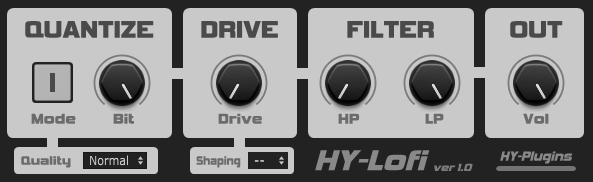
This one is a small focused “digital damage” insert that does the core lo fi moves with almost no friction: bit quantization, waveshaper drive, and simple high pass low pass filtering.
Right off the bat, HY Lofi is not trying to be a nostalgic cassette or vinyl simulator with a hundred artifacts, but rather the kind of plugin you drop on a drum bus, a resample chain, or a synth group when you want controlled crunch and bandwidth limiting fast.
In addition to that, the quantizer is the center of HY Lofi with two quantize modes, a Quality control, and a Bit control for depth.
- Why it’s good choice for Lo-Fi:
You get bit quantization with two modes where Mode 2 pushes quantization error toward higher frequencies for less generic bitcrushing. Drive section with three waveshape modes adds density and attitude. HP and LP filtering keeps lo fi layer inside controlled bandwidth. Lightweight and focused for fast resampling and bus coloration without friction.
- Quantizer Section
The quantizer gives you two quantize modes, a Quality control, and a Bit control for depth. Mode 1 is normal quantization behavior. Mode 2 pushes the quantization error toward higher frequencies, which reads less like generic bitcrushing and more like a specific cheap converter or weird resampling chain. Quality determines whether the result feels like a controlled artifact layer or harsh, brittle mess when pushing low bit depths.
- Drive and Shaping
The drive section includes a Drive amount plus a Shaping selector with three waveshape modes and a bypass option. This is where the plugin moves from “bit reduction” into “density and attitude.”
The shaping options decide whether you get a tight, clipped transient profile for drums, or a thicker, more harmonically busy tone that helps samples feel printed. You can decide whether to distort before the quantizer character takes over, or keep drive minimal and let the quantizer artifacts be the main color.
- Filter Section
The filter section includes HP cutoff and LP cutoff. If you are adding quantization grit, you often need to trim brittle highs or clear subs depending on the source. Having HP and LP right there means you can keep the lo fi layer inside a controlled bandwidth and avoid the common mistake where degradation becomes the loudest thing in the mix.
6. Audiolatry Mel Lofi
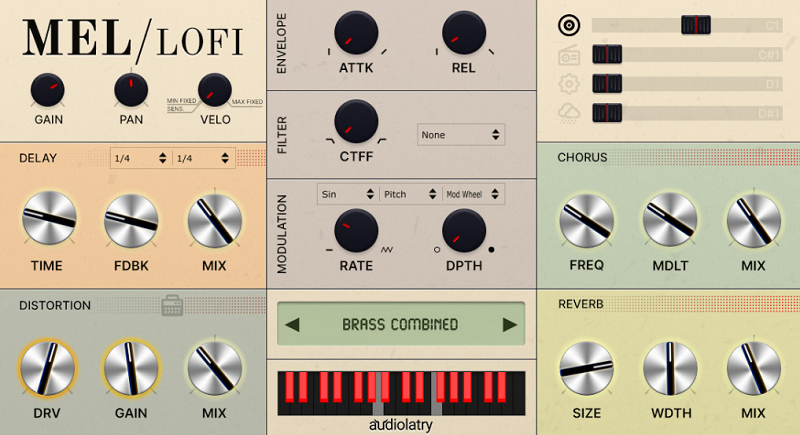
Lastly, I also included second plugin from Audiolatry Mel Lofi plugin and it ships with 24 multi sampled presets in the current version, presented as ready to play instruments rather than raw samples. In fact, the “Mellotron” side is the familiar palette: strings and choirs that smear into chords, flutes and vintage leads that feel like tape playback, and a few vibey keyboard style tones.
On top of that, Audiolatry includes a legacy v1 in the download, so if you used an earlier build in old projects you are less likely to break sessions when you update.
- Why it’s good choice for Lo-Fi:
You get 24 multi sampled Mellotron presets with instant character that already sound rough and imperfect. Four dedicated effect layers for vinyl, radio noise, mechanical belt noise, and rain let you dial atmosphere inside the instrument.
Velocity control lets you lock into fixed velocity like original hardware behavior for consistent chord beds. Built in delay, chorus, distortion, cabinet, and reverb finish patches without external plugins.
- Sound Set and Presets
Mel Lofi ships with 24 multi sampled presets including strings and choirs that smear into chords, flutes and vintage leads that feel like tape playback, and vibey keyboard style tones. The v2 update increased the preset count and added Octave Strings intended to emulate old tape strings. A legacy v1 is included in the download so you don’t break old sessions when you update.
- Four FX Layers System
The built in four dedicated effect layers include Vinyl, Radio Noise, Mechanical Belt Noise, and Rain. Each layer has its own on off and level control, and Audiolatry labels them to corresponding keyboard notes so you can audition and control them quickly. I would say this lets you write with atmosphere, then pull it back when you need a cleaner chorus, or push it up in an intro without building extra tracks.
- Built In Effects
Mel Lofi includes delay, chorus, distortion, cabinet, and reverb. The cabinet paired with distortion helps keep grit musical instead of fizzy, which is a common problem when people distort Mellotron type material. The value is speed: you can widen with chorus, add depth with reverb, smear with delay, and rough it up with distortion plus cab without turning the instrument track into a plugin stack.

Hello, I’m Viliam, I started this audio plugin focused blog to keep you updated on the latest trends, news and everything plugin related. I’ll put the most emphasis on the topics covering best VST, AU and AAX plugins. If you find some great plugin suggestions for us to include on our site, feel free to let me know, so I can take a look!