
The difference between a great piano plugin and one that collects dust isn’t sound quality, it’s workflow. In 2026, the best piano plugins understand that producers need instruments that actually finish songs: pianos that respond like real instruments, sit in mixes without surgery, and load fast enough to capture ideas before they disappear.
I will cover physical modeling engines that never touch your SSD, deeply-sampled libraries with robot-assisted precision, and hybrid platforms that swing from concert realism to cinematic atmosphere.
You’ll find plugins that generate intelligent performances from chord progressions, instruments with 32-way velocity switching that feel alive under your fingers, and production-ready tools with mic perspectives and built-in processing chains designed to get you from loading the plugin to recording the part in under a minute.
Before we dive in, here are the few plugins I’ll cover: Toontrack EZkeys 2, Spectrasonics Keyscape, Arturia Piano V3 and some more, including 5 free options.
With that being said, let’s get started:
1. Toontrack EZkeys 2
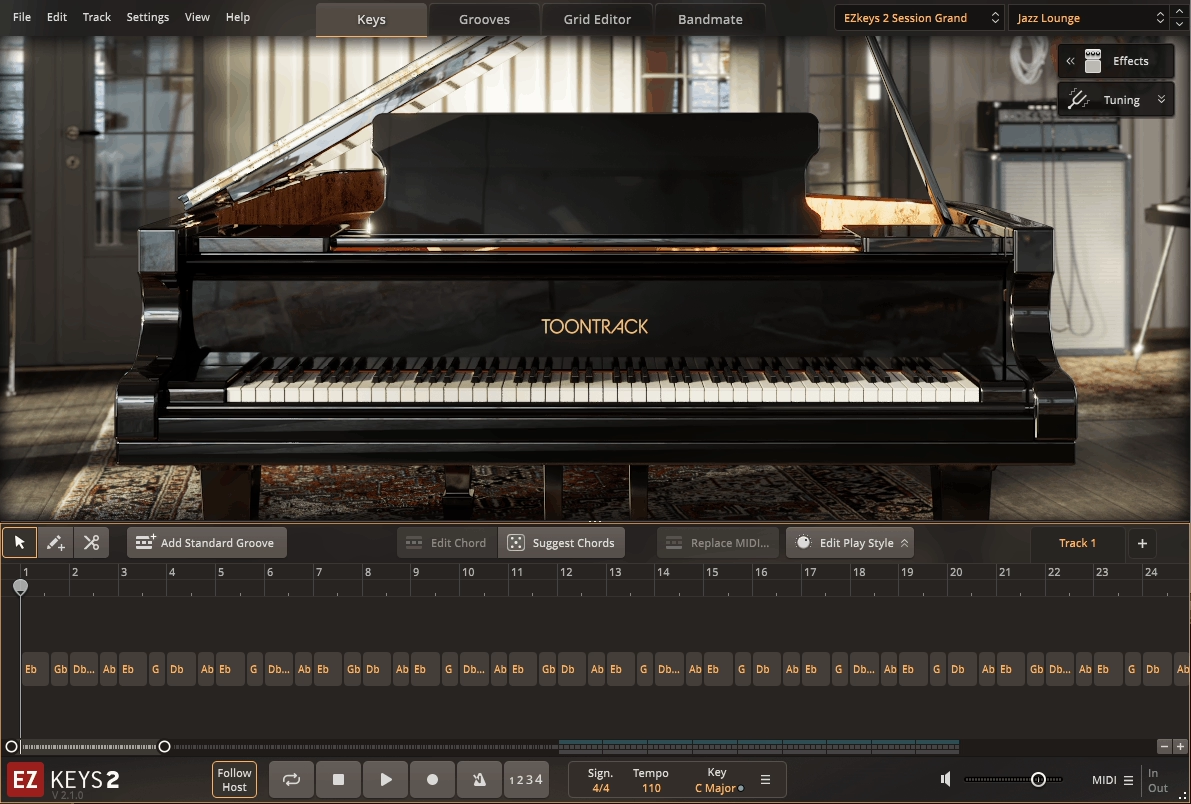
If you’re a producer or songwriter who needs piano parts that actually sound like someone sat down and played them, rather than just holding down block chords for three minutes, you need a different kind of tool. Most piano plugins give you a great sound and then leave you staring at an empty MIDI roll wondering what to play.
Toontrack EZkeys 2 is a hybrid of piano instrument plus session pianist plus songwriting/arranging engine, built for one core workflow: you feed it chords, audio, MIDI, or a rough rhythm idea, and it helps you generate musical, playable piano parts that actually follow the song.
The reason why I think it belongs in this roundup is that the plugin is as much about getting finished piano parts into a production fast as it is about the raw piano tone itself.
- Core Identity: Piano Plus Virtual Pianist
The plugin’s core function acts like a virtual pianist, letting you quickly build an authentic piano performance that follows the chord sequence of your song. This distinction is important, because the killer feature isn’t just giving you a piano sound but a piano that can intelligently perform for you, then lets you edit that performance down to the details.
I think this is what separates this instrument from traditional piano libraries. For instance, instead of programming every note yourself or hiring a session player, you’re working with an intelligent system that understands musical context and generates parts that actually make sense in the song.
- The Sound Source
The plugin includes an all-new core piano recorded from a Fazioli F212 grand, captured at Riksmixningsverket Studio in Stockholm through a Neve 8068 console, with Toontrack stating the core library is about 4 GB and designed for maximum versatility and playability.
In practice, that means the piano is meant to be the “do everything” base tone you can shape into different roles rather than a single hyper-specific classical recording. I appreciate how this approach keeps the plugin lean and fast-loading while still delivering professional sound quality that works across genres from pop to hip-hop to country.
- Bandmate: Chord and Rhythm Recognition
Bandmate is one of the biggest “version 2” upgrades, and it’s the feature that turns the plugin into a real production assistant. You can import audio or MIDI and the system will analyze it and give you chord and groove suggestions that fit what you already wrote.
I think the practical value is huge for real sessions: you can have a guitar/vocal demo or a synth progression and get piano ideas that “lock” to it without manually entering every chord. That being said, this is especially useful when you’re working on a track and need the piano to complement what’s already there rather than fighting for space or playing in a different key.
- Tap2Find: Get Grooves by Tapping
Tap2Find is the other major idea generator. You input a rhythm (and optionally notes), and the system searches for matching MIDI phrases and groove performances.
I like how this is a fast bridge from “I hear a rhythm in my head” to “here are playable piano parts that match it.” This is especially useful when you don’t want a generic arpeggio but something that feels like an actual pianist’s right-hand rhythm, voicing density, and timing. For instance, you can tap out a syncopated rhythm you’re hearing and the plugin will find piano performances that capture that feel.
- Chord Tools for Songwriting
The plugin leans hard into chord-first songwriting, with tools like a chord wheel and suggested chords to help you find progressions quickly. The suggested chord function and chord wheel help you find suitable chords or speed up chord entry without needing to be a theory expert.
I would say if you are into pop, hip-hop, EDM, or scoring cues where harmony exploration matters more than virtuoso playing, this is one of the most practical reasons to pick EZkeys 2 over a “pure piano” instrument.
- Grid Editor: Deep MIDI Control
Once the plugin generates a performance, the Grid Editor is where you make it yours. The grid includes tools designed for musical refinement: humanization, scale matching, and precise timing/velocity control.
The net result is that you can keep the musical intelligence of the generated part while still shaping it into something that feels like your production. Whether you need it tighter, looser, simpler, more complex, more left-hand heavy, or more right-hand busy, it gives you control without forcing you to reprogram everything from scratch.
2. Spectrasonics Keyscape
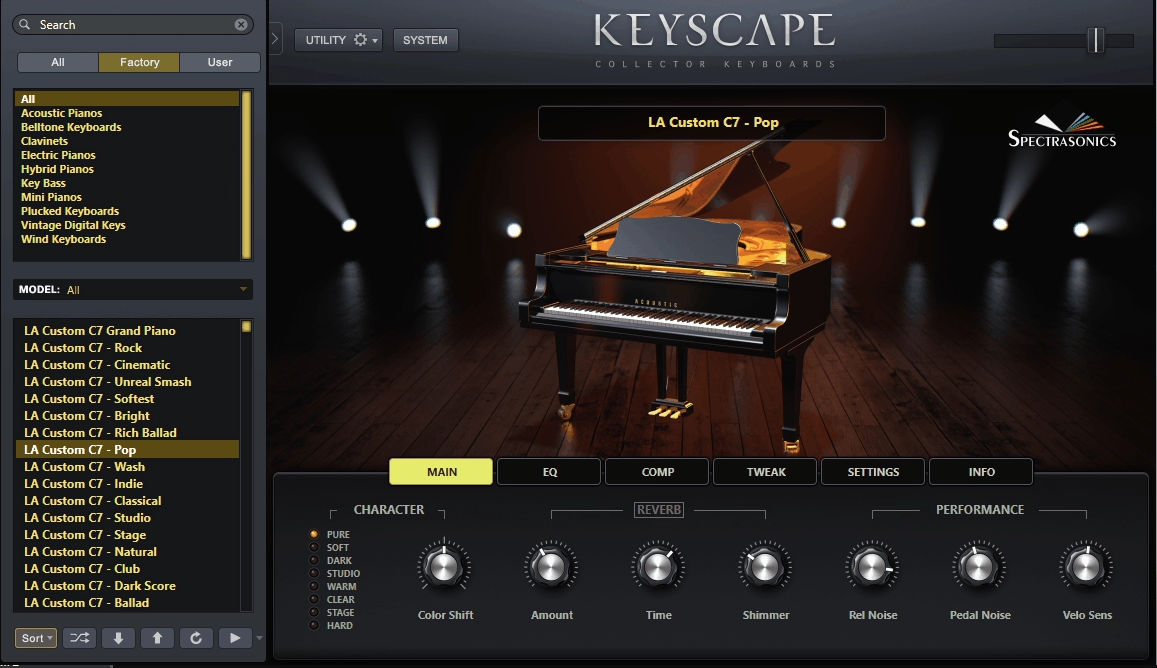
If you’re looking for a piano plugin that captures the character and soul of legendary instruments rather than just technically perfect recordings, you need something built around vintage tone and historical significance. Spectrasonics Keyscape delivers exactly that by restoring rare real instruments, sampling them obsessively, and keeping the quirks that make them feel alive instead of sanitizing everything into generic perfection.
I must say for a Grand & Upright piano roundup, Keyscape earns its place because the piano side isn’t an afterthought. You’re getting a deeply sampled LA Custom C7 grand, a characterful Wing Upright, and a Double Felt Grand that’s basically built for modern “soft / intimate / cinematic” piano writing.
- The Piano Instruments That Matter
The main “serious piano” centerpiece is the LA Custom C7 Grand Piano. Keyscape doesn’t present it as one static piano patch, but as a set of purpose-built variations like Ballad, Bright, Cinematic, Classical, Club, Dark Score, Indie, Pop, Rock, Soft Pop, Studio, Stage and more.
I think this is the right way to do a sampled piano in production because “good piano” depends on the role in the mix, not just the instrument itself. Those variations are effectively different perspectives/voicings/processing choices tuned for common production use cases, so you can land on the right fit quickly instead of doing surgery with EQ every time.
For uprights, the standout is the Wing Upright. It comes as a core upright plus multiple vibe-leaning variations like Dark Indie, Honky Tonk, Lonely Basement, Sixties Mute, mono options, octave flavors, tremolo, and even vinyl-ish movement styles. I appreciate how upright piano is usually chosen for midrange personality, intimacy, and texture, and Keyscape leans into exactly those identities instead of trying to make every upright behave like a “mini grand.”
Then there’s the Double Felt Grand, which Keyscape positions as a separate piano model with its own production-leaning versions like Cinematic, Dark, Distant, Dry, Session, Shimmer Wash and more. This is the modern “soft hammer / felted tone” lane that’s perfect for emotional piano without bright transient edges.
- Sampling Depth and Playability
Keyscape’s most important technical advantage is depth. Spectrasonics explicitly states the collection uses deep multisampling with up to 32-way velocity switching plus round robins, which is a big reason the pianos don’t collapse into obvious repetition when you’re playing repeated notes, fast patterns, or realistic dynamic phrasing.
I like how that “many layers plus variation” approach is exactly what separates premium sampled pianos from “nice at first, robotic after 20 seconds.” On top of that, Keyscape is designed to keep the “real instrument stuff” intact: mechanical noise, pedal noise, and release noise / release overtones are part of the realism package.
For instance, those details are what make quiet passages feel human and close-mic’d rather than sterile and disconnected from a physical mechanism. To me, this attention to the imperfect elements is what makes Keyscape pianos sit naturally in tracks without sounding overly polished or fake.
- Custom Controls and Effects
Here’s the natural rewrite:
A huge Keyscape strength is that each patch has Custom Controls tailored to that instrument and sound. Spectrasonics frames these as performance-focused controls plus high-quality creative effects processing designed specifically for each patch, and it shows up in real workflow as getting you straight to usable results without building the entire processing chain from scratch.
For pianos, this typically means you can shape character, tone, dynamics feel, stereo image, and vibe quickly, and then commit to the part instead of endlessly auditioning external processing. I would say this can valuable for producers who need radio-ready piano sounds without spending an hour tweaking plugins.
- Real Talk: What You Should Know
Keyscape isn’t universally loved by everyone, and I think it’s important to address the honest feedback. One common issue is feel and dynamics, where some users report that the C7 can feel like it has “stepped” dynamics depending on controller setup.
In practice, this is often a velocity curve problem, and even Keyscape’s own FAQ stresses the importance of setting the instrument to respond properly to your controller. That being said, once you dial in the right velocity curve for your keyboard, the response improves dramatically. The honest takeaway is: Keyscape rewards proper velocity setup, and if you demo it with a mismatched curve, you can easily get the wrong impression.
Another thing worth mentioning is that Keyscape’s pianos have a strong personality. If you’re expecting a perfectly even, classical-neutral Yamaha-style sample set, you might bump into moments that feel like “character” rather than “idealized.” I would say this isn’t necessarily a flaw, it’s just the nature of sampling real vintage instruments with their quirks intact.
- Why It Belongs on This List
Keyscape makes sense in a the best piano plugins roundup because it delivers multiple premium piano personalities that cover real production needs across genres from country to hip-hop to film scoring. You’re getting a full, produced grand (LA Custom C7), a character upright (Wing Upright), and a modern felt-style piano (Double Felt Grand), all with deep velocity sampling, round robins, and mechanical/pedal/release realism.
The honest positioning is this: it’s not a single “perfect concert grand” plugin, it’s a production-first piano toolkit that can sound stunning fast, especially when you take 60 seconds to match the velocity curve to your controller.
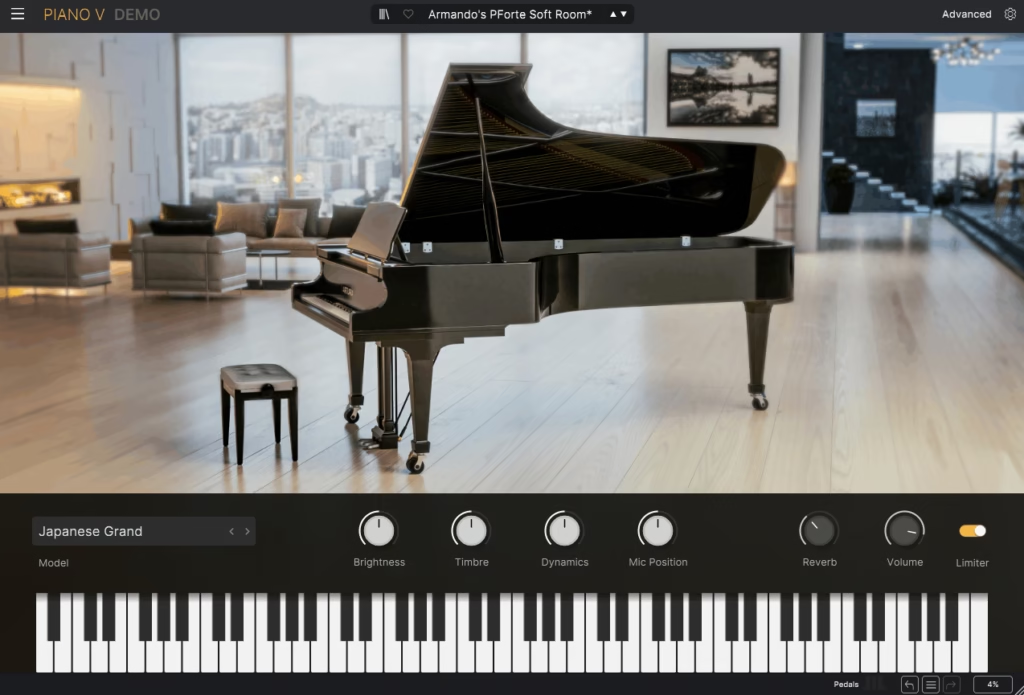
3. Arturia Piano V3
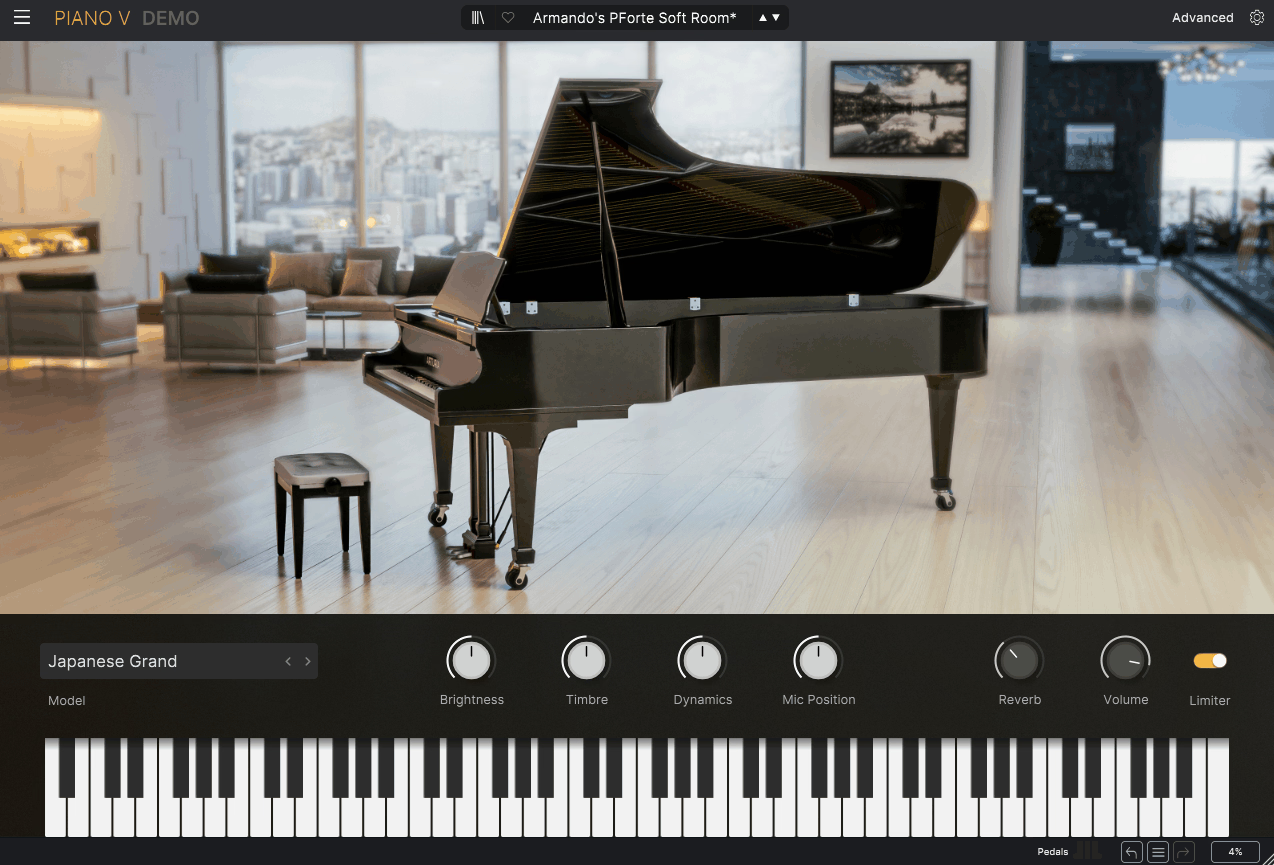
Arturia Piano V3 is a physical-modeling piano instrument built around a very specific idea: instead of chasing one “perfect concert grand,” it gives you a production-focused piano studio where you can pick a model that already sits in a track, then shape mechanics, resonance, mic perspective, and dynamics like you would in a real session. I must say it’s sample-free physical modeling, so the tone is generated in real time, and the entire feature set is aimed at letting you steer projection, resonance, and character quickly rather than endlessly auditioning gigantic libraries.
This is what you need when you’re working across multiple genres and need a piano that adapts to the track rather than forcing the track to adapt to the piano. The modeling approach means you’re getting responsive, CPU-efficient instrument that load instantly and behave consistently across sessions.
- The 12 Modeled Pianos
Piano V3 comes with 12 distinct piano models, and the variety isn’t filler. You’ve got “traditional” anchors like American Grand, German Grand, Japanese Grand, and multiple uprights (Jazz Upright, Piano-bar Upright, Pop Upright, Classical Upright, plus Tack Upright), and then you’ve got intentionally “produced / non-traditional” models like Glass Grand, Metal Grand, and Plucked Grand.
I appreciate how Arturia isn’t asking you to turn one neutral piano into every sound with EQ; it’s giving you different starting points that naturally land in different roles: bright pop, tight jazz comping, upright character, lo-fi tack bite, or sound-design pianos that cut through dense mixes without fighting vocals. For instance, when you’re working on an indie folk track, you can grab the Classical Upright for warmth, then switch to the American Grand for a power ballad chorus.
- The Model Layer Controls
The real reason Piano V3 belongs in a “best piano plugins” conversation is the amount of instrument behavior you can shape. Arturia exposes controls that directly affect the mechanical and acoustic model, not just the output tone.
That includes hammer action, string age, unison detuning, stretch tuning, dynamic range, and crucially, resonance controls like soundboard resonance, sympathetic resonance, and duplex resonance. I think duplex resonance is the “color” layer that adds harmonic sparkle and complexity (the kind of overtone behavior that can make a modeled piano feel more alive on sustained notes), and Arturia explicitly calls it out as adjustable alongside the soundboard response.
- Projection and Resonance Shaping
Piano V3 leans into the idea of shaping how the instrument “projects,” not just how it’s EQ’d. You can adjust lid position for brighter/more open projection or a more contained tone, and you can tune how the soundboard responds, which affects how the piano blooms and sustains.
To me, it matters because a lot of “realism” in piano plugins is actually about whether chords open up naturally and whether the sustain has believable body and movement, especially when you ride the pedal and play in the midrange. That being said, these controls let you shape the piano’s character to match the emotional arc of the song without needing external processing.
- Mic Perspectives and Mix Placement
Arturia positions Piano V3 as a “studio in the box,” and a big part of that is multiple microphone configurations. Instead of locking you into one baked recording perspective, you can cycle through mic setups, blend in more room sound, and widen the stereo image for cinematic or modern pop contexts.
I must say this is one of the quickest ways to decide whether a piano belongs in front of the mix (closer mic perspective, tighter room) or inside the mix (more room/width), without doing heavy reverb/EQ gymnastics. For instance, you can use a close perspective for intimate singer-songwriter productions, then switch to a distant, roomy perspective for orchestral arrangements.
- Mechanical Noise and Human Detail
Piano V3 lets you dial in mechanical noises like pedal noise, key noise, and hammer noise. In practice, these controls do two important jobs. First, they let you add that subtle “I can hear the instrument” intimacy that makes quiet parts feel real.
Second, they let you remove noise if you’re doing clean pop or stacking multiple layers where mechanical detail would build up and clutter the top end. I appreciate how Arturia calls out these mechanical noise controls explicitly as part of the engine’s realism toolkit.
- Real Talk About Perception
There’s a real split in how people perceive Piano V3’s tone. Some users describe it as pretty thin or synthetic, especially if they’re coming from a flagship sampled piano or Pianoteq, while others say V3 is a clear leap over V2 and that it’s best understood as a production piano designed to cut through a mix rather than mimic a pristine classical recording by default.
To me, Piano V3’s strengths show up when you choose the right model (grand vs upright vs tack) and then use the projection/resonance/mic tools to place it where you want in the track. I would say it’s about control over the parts that make a piano sit correctly.
4. XLN Audio Addictive Keys
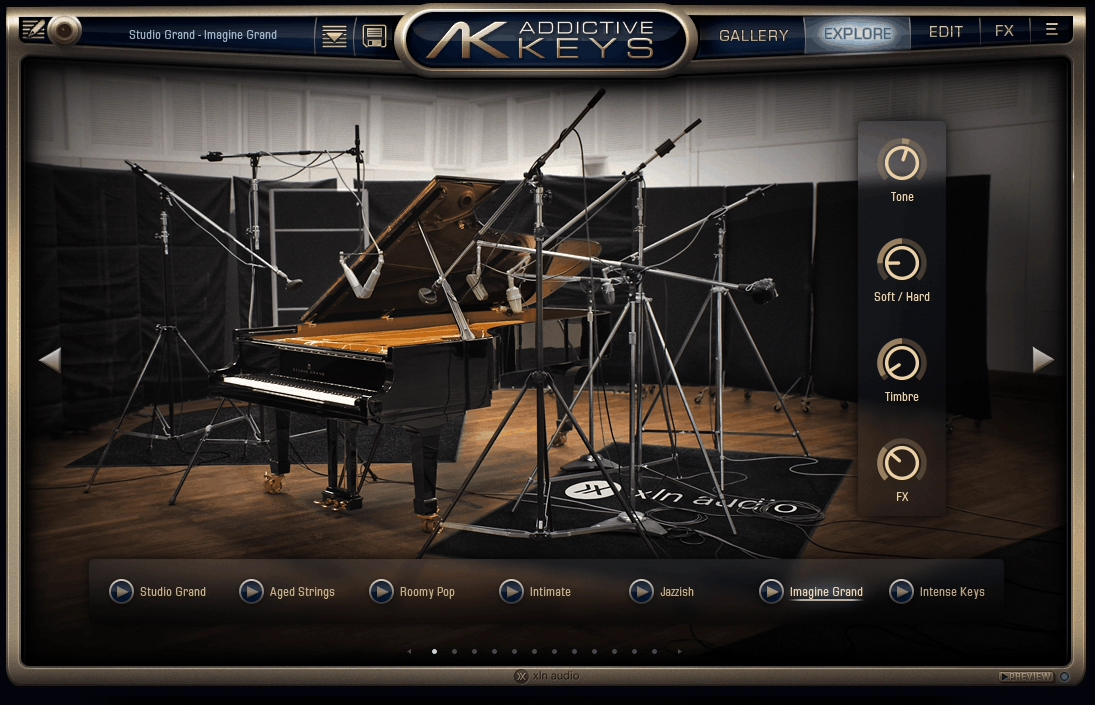
If you’re tired of piano plugins that sound great in isolation but require hours of EQ, compression, and spatial processing to actually sit in a mix, this one is for you.
XLN Audio Addictive Keys is built around a simple, producer-practical idea: give you a few deeply sampled, mix-ready pianos and keys inside one consistent engine, then make it fast to shape them with mic perspectives, channel-style processing, and musical modulation without turning the instrument into a science project.
I must say reviews have praised it for being great-sounding and easy to use, with mic options and flexible processing that’s actually relevant in real sessions.
- What’s Actually Inside
As with some other libraries in this list, Addictive Keys isn’t “one piano.” It’s an engine that hosts multiple instruments, and the lineup people typically work with includes Studio Grand, Modern Upright, Mark One (Rhodes-style), and Electric Grand (CP-80). Even if you’re focusing on Grand & Upright, the important context is that XLN treats each instrument like a complete production source, not a single neutral patch.
For instance, the Electric Grand instrument is explicitly a meticulously sampled CP-80, which hints at XLN’s general approach: pick a real iconic instrument and capture it thoroughly. I think this focused approach is why the instruments in Addictive Keys tend to have strong personality rather than trying to be everything to everyone.
- Mic Options
One of the most consistently highlighted advantages is microphone flexibility. Reviews call out great sound and mic options, and in practice that’s what makes Addictive Keys useful for producers: you can steer the piano between tight/close pop presence, natural room bloom, or more distant cinematic placement without rebuilding the sound with external chains.
- Channel Editing and Built-In Processing
Addictive Keys is designed like a small mixing environment for piano rather than a raw sample player. Reviews specifically praise flexible channel editing and processing, and that’s the heart of how you get “finished” tones quickly.
I like how instead of loading a grand and immediately reaching for five inserts, the engine encourages you to shape the sound internally using channel-style controls and effects, which is why it’s often described as quick to dial for production rather than only for solo classical performance. That being said, this integrated workflow is what makes it so popular in commercial studios where time is money and clients expect you to nail piano tones fast.
- Cross-Mod and Movement Tools
A sneaky reason Addictive Keys holds up in modern tracks is that it includes modulation-oriented tools that help you create motion and “production life” without turning the piano into a synth. I think this matters most for modern pop, indie, and ambient contexts where you want subtle movement, widening, or evolving tone so the piano supports the arrangement rather than sitting like a static block.
For instance, you can add gentle modulation that makes the piano feel like it’s breathing with the track, which is exactly the kind of detail that separates professional productions from home demos. In addition, these movement tools let you keep the piano interesting across a four-minute song without needing to constantly change parts or add extra plugins.
- Why It Belongs on This List
If your goal is realistic pianos that mix easily, Addictive Keys earns its spot because it nails the producer essentials: great core tone, mic options, and built-in channel processing that helps you shape the piano into the track quickly, with enough modulation and movement tools to keep it from feeling static in modern productions.
I would say it’s not positioning itself as the most clinically realistic concert grand ever, but rather as the piano you can actually finish songs with, and the long-running review consensus from working producers across the country supports exactly that.
5. Modartt Pianoteq 9 Stage
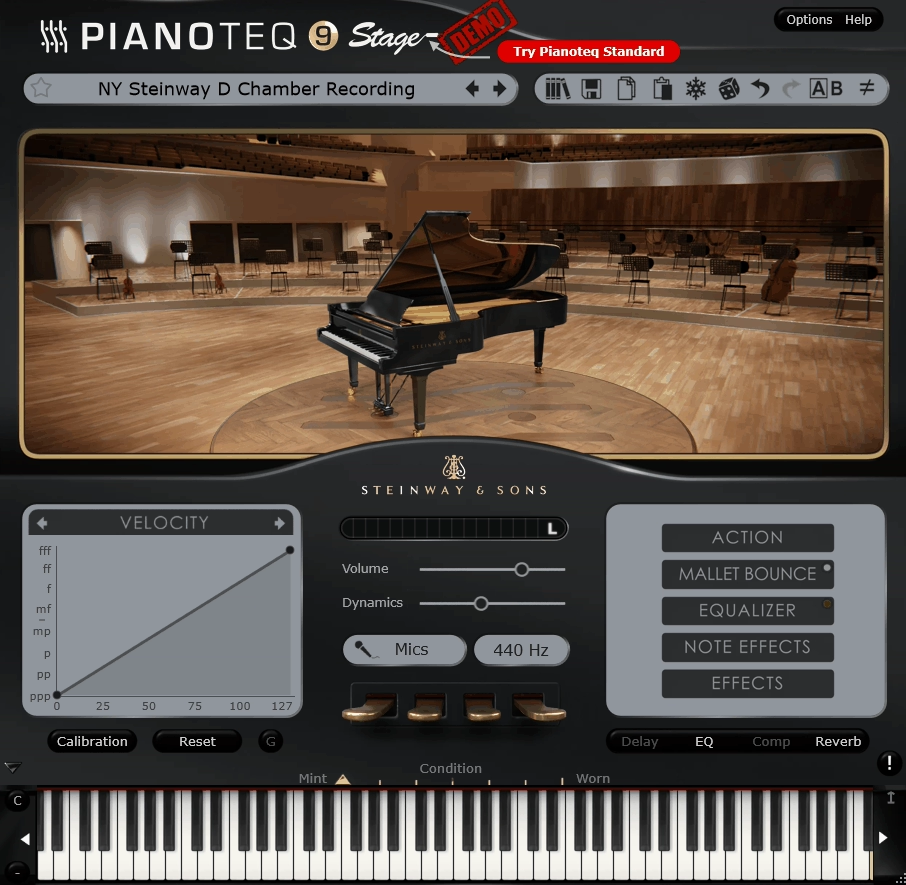
Modartt Pianoteq 9 Stage is the rare piano plugin that gets recommended for totally opposite reasons by totally opposite people: producers love it because it’s tiny, fast, and insanely playable, and pianists love it because it behaves like an instrument instead of a sample playback machine.
The big differentiator is that Pianoteq is built on physical modeling, meaning it generates the piano sound in real time rather than streaming multi-GB samples, and Modartt explicitly frames Pianoteq 9 as “vivid, expressive, customizable” while staying incredibly lightweight.
I must say the Stage edition is the “plug in and play” tier: same sound engine and playability as the higher versions, but with fixed/locked advanced parameters so you focus on performance instead of deep tweaking. To me, this approach makes perfect sense for working musicians who need great piano sound right out of the box without becoming sound designers.
- What Changed in Pianoteq 9
Pianoteq 9’s headline improvement is a new/enhanced soundboard model. I noticed that this engine improvement enhances how the instrument models the piano’s soundboard, and multiple product summaries emphasize that this improves stereo and spatial perception.
In practical terms, this is the exact area where modeled pianos either feel “flat” or feel like a real box of wood resonating in a room. I think a better soundboard model translates into a more believable sense of depth, movement, and “air” around the notes, especially on sustained chords and pedal work where you can really hear the resonance building naturally.
- Why Pianoteq Is Still a Top Pick in 2026
The Pianoteq approach gives you three big advantages that stay relevant no matter how good sample libraries get. First, you get full dynamics without velocity switching because the engine isn’t crossfading between recorded layers; it’s generating the response continuously, which tends to feel more connected to your hands.
Second, it’s extremely responsive and playable, because there’s no heavy disk streaming bottleneck that creates latency or stuttering. And third, Modartt highlights that Pianoteq is only about ~50 MB for the core install on desktop platforms, which is almost comical compared to modern sampled grands that can eat up 100+ GB of drive space.
That combination is why Pianoteq is a “daily driver” plugin for composers and producers who need great results fast without waiting for massive sample libraries to load every time you open a session.
- Stage Edition: What You Get and What’s Intentionally Locked
Pianoteq 9 Stage includes 2 instrument packs of your choice (plus free instruments), and Modartt is explicit that it uses the same sound engine and playability as Standard/Pro.
The difference is control depth: Stage is built for immediate results, with a simplified interface and fixed advanced settings, which is ideal if you want to load a piano and just play without falling into parameter rabbit holes.
For instance, if you’re a songwriter or producer who just needs a reliable grand piano sound for demos or final tracks, Stage gets you there without overwhelming you with microphone placement options or deep physical modeling adjustments. That being said, Modartt frames Stage as upgrade-friendly, so you can move up later if you need advanced features.
- Grand and Upright Coverage
For this roundup, Pianoteq is a strong choice because the ecosystem is built around instrument packs rather than a single baked-in piano. Stage can run the full Pianoteq instrument lineup (even if it doesn’t expose every deep edit parameter), so the “grand vs upright” angle is really about which packs you choose.
I like how Modartt’s store shows upright options like the U4 Upright among the available packs, alongside a long list of grands. You can credibly cover both categories under one lightweight engine and simply choose the grand and upright packs that match your style, whether you’re going for concert hall grandeur or intimate living room character.
- Sound Shaping in Stage: What You Can Rely On
Even though Stage is the simplified tier, it’s not a stripped-down version. I noticed that the underlying modeling accounts for performance-critical behaviors like string interaction, pedal behavior, cabinet resonance, and hammer position, which are the exact elements that make a piano feel physical,
In addition, because it’s modeling, you’re not locked into a single mic recording perspective; the engine is designed around responsiveness, clarity, and the sense that the instrument is being generated in the moment. At the end of the day, this means you’re getting a piano that responds musically to your playing dynamics rather than just triggering static recordings.
6. IK Multimedia Pianoverse
If you need multiple flagship pianos inside one consistent engine instead of juggling separate libraries that all sound different, you’re looking at a platform approach rather than a single instrument plugin. IK Multimedia Pianoverse delivers exactly that by combining robot-assisted deep multisampling with a production-ready sound-shaping layer and a huge emphasis on space.
To be honest, the reason it deserves a 2026 spot is simple: it’s not trying to be one perfect piano, it’s trying to be a complete piano ecosystem where each instrument can swing from concert realism to cinematic sound design without leaving the plugin.
- Core Concept: Dry Pianos Plus Spaces and FX
A defining design choice in Pianoverse is that the raw pianos are described as very dry, meaning you’re getting a clean, controlled capture that’s meant to be shaped. Reviewers call out that the internal Spaces and FX are high quality and cover everything from realistic rooms to “far out” sound design environments.
I think the workflow makes perfect sense: pick a piano, then choose whether you want it to live in a believable studio/hall or in an exaggerated cinematic world. For instance, you can take the same piano from intimate jazz club to massive concert hall without loading different sample libraries or patching external reverbs.
- Robot-Assisted Deep Multisampling
IK repeatedly centers the collection around robot-assisted recording and deep sampling consistency. For example, Gran Concerto 278 is based on a 9.5′ Fazioli F278 concert grand, and the Black Diamond B280 uses a Bösendorfer 280 Vienna Concert.
I appreciate how the practical benefit of this approach is repeatability and detail: consistent strikes across dynamics, controlled capture, and the kind of note-to-note coverage that helps a piano hold up under exposed playing, repeated notes, and layered arrangements. To me, this is what separates professional piano libraries from budget options that start showing their limitations once you play anything beyond basic chords.
- Real Performance Features
Reviews note Pianoverse feeling more alive and organic, with performance realism features including sostenuto, half-pedalling, and extra realism from the underlying modeling layer.
I think this matters a lot because a lot of sampled pianos sound gorgeous in simple demos but fall apart when you use real pedal technique, especially half-pedal transitions and classical-style articulation. In addition, Pianoverse includes modeling controls that let you adjust hammer noise, pedal sounds, and sympathetic resonance from subtle to extreme, so you can dial the instrument toward clean studio polish or toward raw mechanical intimacy depending on the track.
- Microphone Perspective Control
A consistent theme in descriptions is mic perspective control. Different instruments include different microphone settings for instrument and room, which is exactly what you want in a modern piano plugin.
I like how you can steer between close, present, mix-friendly tone and a more distant, cinematic perspective without rebuilding the whole chain. This becomes especially important when layering with vocals or dense synth stacks, because a piano that’s too roomy will smear, and a piano that’s too close can feel aggressive in the mix.
Freebies:
1. Audiolatry Grand Piano
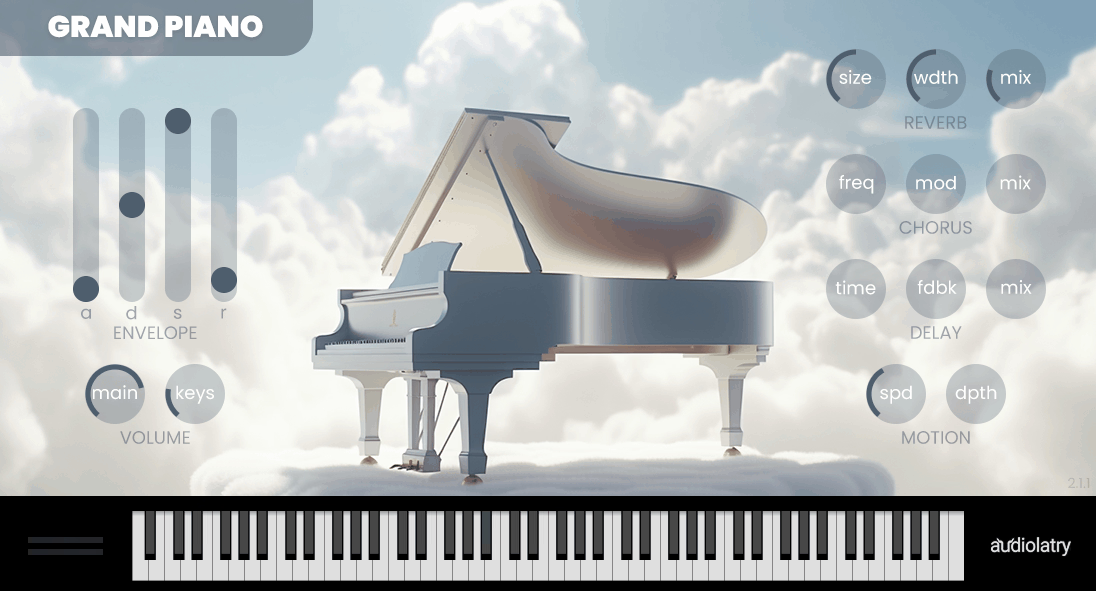
Audiolatry Grand Piano is a free piano that delivers professionally sampled Steinway Model D grand with multiple velocity layers, round robins, and adjustable release samples that actually respond musically instead of sounding like a cheap preset.
- What You’re Actually Getting
The plugin is based on a sampled Steinway Model D grand piano with multiple velocity layers that respond naturally to your playing dynamics. I appreciate how Audiolatry included round robin samples to prevent the obvious “machine gun” effect you get with cheap free pianos when you play repeated notes.
In addition, the plugin features adjustable release samples that let you control how much string resonance you hear when you release keys. For instance, you can dial this down for tight, controlled pop productions or push it up for more classical, resonant performances where you want the piano to breathe and sustain naturally.
- Sound Quality and Mix Readiness
What stands out to me is that the tone sits naturally in mixes without extensive processing. Reviews consistently mention that it sounds professional and usable right out of the box, which is rare for free piano plugins that usually need heavy EQ and compression just to be acceptable.
I must say the midrange presence is particularly strong, which means the piano cuts through dense arrangements without getting buried under drums, bass, and synths. For instance, when you’re working on a pop track with a full instrumental, this piano maintains its position in the mix without fighting for space or needing aggressive boosting.
- Real Talk About Limitations
I would say the main limitation is that it’s a single piano with limited sound-shaping options compared to premium libraries. You’re not getting multiple mic perspectives, extensive effects chains, or the ability to completely transform the character of the instrument.
That being said, for a free plugin, it does one thing well: giving you a believable grand piano sound that works in real productions. To me, that focused approach is more valuable than having 50 mediocre presets that all sound artificial.
2. Bitsonic Keyzone Classic
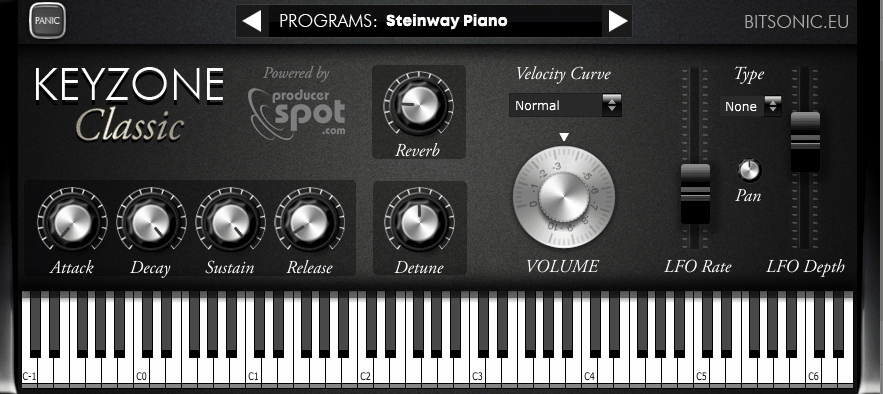
If you’re just starting out in music production or need a reliable backup piano that doesn’t cost a dime, you need something that loads fast, sounds professional enough for real tracks, and doesn’t require a PhD to operate. Bitsonic Keyzone Classic is a deceptively simple sample-based piano plugin that earned its reputation because it nails the one thing most free pianos mess up: useable, mix-ready core tone across a few practical presets, without forcing you into a giant “piano library” workflow.
I must say it’s not trying to be an ultra-detailed concert grand with endless mic positions. It’s a small set of bread-and-butter piano and e-piano sounds that load fast, play musically, and cover a ton of real production needs.
- The 5 Presets and What Each One Does
Keyzone Classic is built around five preset instruments: Piano from Keyzone 1, Yamaha Grand Piano, Steinway Grand Piano, Basic Electric Piano, and Rhodes Piano. This is the core identity of the plugin, and it’s also why it works so well in beginner-to-intermediate workflows: you’re not scrolling 400 patches, you’re picking the right “role” instantly.
I guess the Yamaha Grand and Steinway Grand are the main reasons people install Keyzone Classic. User feedback repeatedly calls these two out as the standout sounds, with the Yamaha and Steinway described as “very good” and often preferred over the default Keyzone Piano preset. For instance, when you need a clean pop piano or a warm jazz grand, these two presets deliver without needing extensive tweaking.
Piano from Keyzone 1 is the “generic” option. It’s usable, but it’s also the one people most often describe as less exciting compared to the Yamaha/Steinway. That being said, if you want a quick sketch piano that doesn’t demand attention, it can still be the right choice for demos or rough arrangements.
Basic Electric Piano and Rhodes Piano are here for production flexibility. I appreciate how the Rhodes is specifically mentioned by users as getting very usable once you add a bit of movement and ambience, including reverb and LFO on pan for stereo motion.
- Tone and Playability
Keyzone Classic tends to land well in real songs because the presets are voiced in a way that’s naturally record-friendly. Multiple user reviews describe the overall sound set as strong enough for everyday needs.
I like how a particularly telling point from user feedback is how the piano reacts to dynamics: after a certain velocity threshold, the tone can shift into a softer piano character, which is exactly the kind of behavior that makes a sampled piano feel more musical under the fingers rather than static.
3. MonsterDAW Golden Piano 2
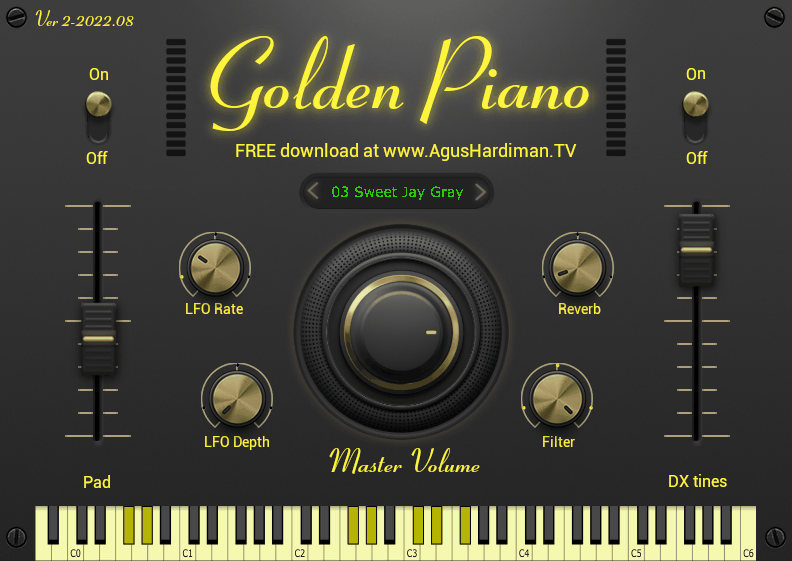
MonsterDAW Golden Piano 2 is a very specific kind of piano plugin: it’s not chasing modern “hyper-real concert grand” realism, it’s chasing a finished, record-ready ’80s/’90s piano character with that bright, glossy, mix-forward piano sound you associate with classic American pop ballads and power ballads from that golden era.
I must say Agus Hardiman (MonsterDAW) positions it exactly that way, referencing classic songwriter and producer aesthetics and framing the instrument as a go-to when you want piano that already feels like a production choice, not a neutral raw capture.
- Core Sound Concept
The best way to think about Golden Piano 2 is preset-driven tone design. The plugin ships with 5 iconic ’80s/’90s piano presets, and the vibe is intentionally geared toward those classic layered and polished keyboard textures, especially the kind of piano that sits up-front in a mix and doesn’t need tons of extra processing to sound “finished.”
I appreciate how the developer explicitly calls out use cases like piano layered with synth pad and piano layered with electric piano, which tells you immediately what lane this lives in: arrangement-ready pop keys, not “solo classical recital.” For instance, when you’re building a power ballad chorus or need that Whitney Houston-era piano sound, Golden Piano 2 delivers that exact character without requiring extensive sound design.
- Presets
Having only 5 presets sounds limiting until you realize what it enables: speed. This plugin is designed so you can pick a sound immediately and start writing/recording, and the presets are curated around a specific era and mix aesthetic.
I think if you’re working on music inspired by the golden age of American pop, rock ballads, or adult contemporary, Golden Piano 2 fits as the free ‘instant vibe’ piano where you open it when you want that sound, fast, without auditioning 200 variations. That being said, the focused preset count means you’re not getting versatility across multiple genres, but that’s not what this plugin is trying to be.
4. RDGAudio Free Piano 2
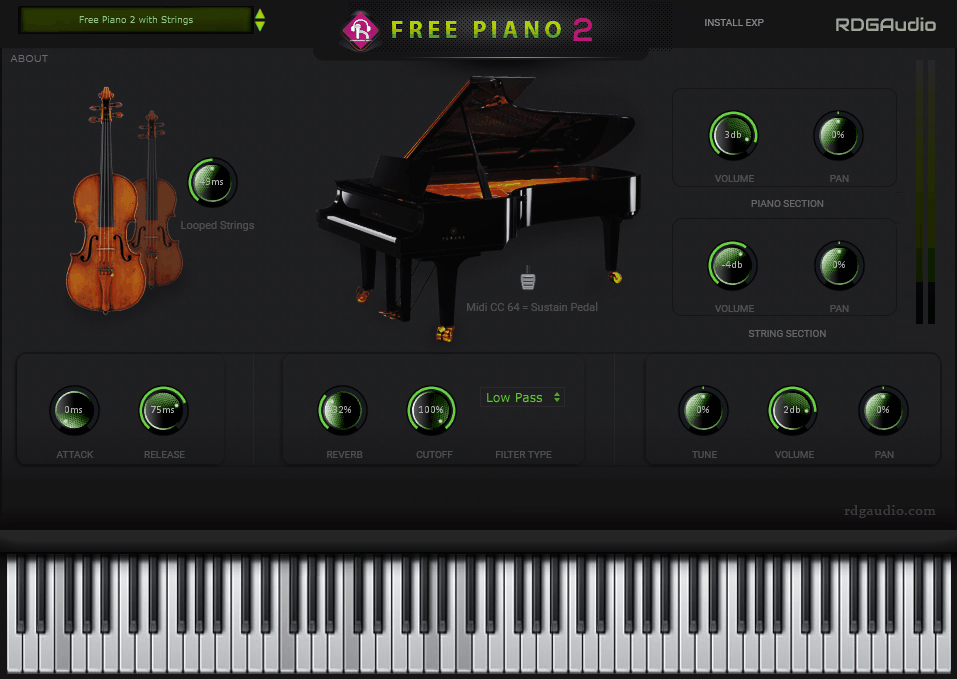
If you need a free piano that can instantly transform into a cinematic, layered sound without loading multiple plugins, you’re looking for something more versatile than a basic grand piano sample. RDGAudio Free Piano 2 is built as a hybrid piano plus strings rompler, meaning you can run it as a straight piano, or blend in string/pad texture to get that instant “cinematic layer” sound without stacking multiple instruments.
I must say the core library is sampled from an “Asian Type D Cottage Piano” using 4 mic positions, and the engine is designed to feel playable rather than static, thanks to velocity sensitivity and round-robin variation.
- Core Sound: Piano Plus Strings by Design
The defining feature is that this is a piano section that includes a dedicated strings section for layered output. Reviews call out the strings section as part of the main sound concept, and it’s described directly as a piano/string hybrid instrument rather than a single-purpose grand.
- Sampling Depth and Realism Tools
Free Piano 2 is built from 600+ samples with 3 velocity layers, which is a meaningful step up from many freeware pianos that rely on very limited dynamic sampling. It also includes round-robin playback (4 round robin) to reduce the “machine-gun” repetition you hear when you repeat notes or patterns.
I appreciate how the “v2” update emphasizes improvements specifically tied to realism and musical continuity, including multi AI round robin samples with velocity and looped strings (seamless), which matters because string layers can sound obviously “cut off” if the sustain isn’t handled well. That being said, having seamless loops means you can hold chords for as long as the song needs without hearing obvious loops or awkward fades.
- Mic Positions and Recorded Perspective
The instrument is sampled with 4 mic positions, which is the kind of detail you normally only see emphasized in paid libraries. I think even if the UI doesn’t expose a full “mic mixer” the way flagship pianos do, the presence of multiple mic captures usually correlates with a more dimensional tone and less “one flat recording” vibe, especially when you’re playing dynamically.
To me, this attention to recording quality is what separates professional free instruments from amateur sample packs that sound flat and lifeless in actual mixes.
5. Meatbeats Micro Keys
If you’re producing house, garage, or any 90s-inspired electronic music and need instant classic keyboard tones that already sound like they belong in the mix, you don’t have time to build sounds from scratch or tweak endless parameters.
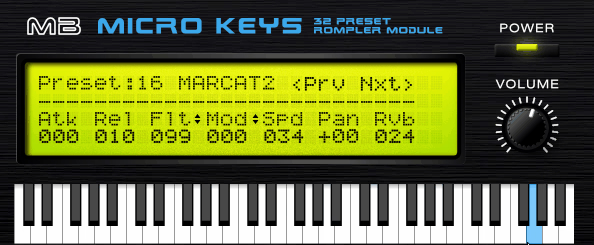
Meatbeats Micro Keys is a 90s rack-sampler ROMpler made for producers who want instant classic house/garage keyboard tones without the hassle, with a UI that stays intentionally minimal so you’re playing and arranging, not designing.
- What’s Inside: 32 ROMpler Patches
It’s 32 authentic ROMpler patches pulled from the vibe of 90s rackmount samplers, split into categories that cover the staples of that era’s productions. Micro Keys includes 4 electric pianos, 2 acoustic pianos, 2 organs, 8 strings, 10 synth patches, 6 basses, and a bonus tenor sax.
I think that spread is exactly why it’s useful: you can build an entire 90s-leaning arrangement from one plugin, then layer multiple instances for thickness. For instance, when you’re crafting a classic house track, you can grab a Rhodes for the main chord progression, layer strings for warmth, and add an organ stab for the hook, all from the same lightweight plugin.
- The Sound Character
Micro Keys is designed to feel like those old “expensive keyboard modules” where the tone is slightly glossy, slightly pre-produced, and immediately recognizable in a mix. User comments describe it as evoking expensive instruments from the 1980s and praise the overall sound quality.
I appreciate how the patch design focus is not realism in a classical sense, it’s recognizable production character with the kind of keys that sit behind a house kick instantly, the kind of organs that lift a garage chorus, and the kind of strings that fill space without sounding orchestral.
- Essential Controls
The UI is deliberately “rack LCD simple,” but Micro Keys gives you exactly the controls you need. Attack and Release let you push patches toward stabby, rhythmic chord hits or long pad-like sustains, which is huge for house/garage writing where the same source might need to behave differently across sections.
A Filter with Low-Pass or High-Pass modes is included for quick mix fitting. LP is how you tuck bright keys behind vocals and HP is how you keep bass-heavy patches from colliding with your low end. In addition, there’s a built-in Modulation section where the target can be Pitch, Pan, or Volume, plus Vintage Reverb for instant finishing.
- CPU and Layering
Lastly, Micro Keys is light on CPU with minimal CPU usage.

Hello, I’m Viliam, I started this audio plugin focused blog to keep you updated on the latest trends, news and everything plugin related. I’ll put the most emphasis on the topics covering best VST, AU and AAX plugins. If you find some great plugin suggestions for us to include on our site, feel free to let me know, so I can take a look!